Jiahong 的个人博客

凡事预则立,不预则废


  • Home

  • Tags

  • Archives

  • Navigation

  • Search

Python——多线程可中断文件逐行处理示例


整体说明

  • 本文示例使用 AI 辅助生成,Prompt 为:
    1
    2
    3
    4
    5
    写一个多线程 python 代码,从一个文件读取数据,然后逐行进行处理,加载为 json 后从中读取 'input' 字段并在前后添加 '```',处理完成后写入另一个文件中,要求如下:
    1. 处理过程中实时打印处理进度
    2. 要求不使用 queue 等高级的包,用原生的 Python 和 threading 包实现即可
    3. 要求写入文件顺序和原始文件的顺序相同
    4. 由于文件很大,且执行过程中可能会随时中断,请用一个文件维护完成情况(完整写入文件才算完成),保证可以随时重启(指定参数 resume=True 时则从中断处启动,否则从头开始重新执行)

多线程可中断文件逐行处理示例

  • 代码示例,仅修改 process_line 即可使用:
    1
    2
    3
    4
    5
    6
    7
    8
    9
    10
    11
    12
    13
    14
    15
    16
    17
    18
    19
    20
    21
    22
    23
    24
    25
    26
    27
    28
    29
    30
    31
    32
    33
    34
    35
    36
    37
    38
    39
    40
    41
    42
    43
    44
    45
    46
    47
    48
    49
    50
    51
    52
    53
    54
    55
    56
    57
    58
    59
    60
    61
    62
    63
    64
    65
    66
    67
    68
    69
    70
    71
    72
    73
    74
    75
    76
    77
    78
    79
    80
    81
    82
    83
    84
    85
    86
    87
    88
    89
    90
    91
    92
    93
    94
    95
    96
    97
    98
    99
    100
    101
    102
    103
    104
    105
    106
    107
    108
    109
    110
    111
    112
    113
    114
    115
    116
    117
    118
    119
    120
    121
    122
    123
    124
    125
    126
    127
    128
    129
    130
    131
    132
    133
    134
    135
    136
    137
    138
    139
    140
    141
    142
    143
    144
    145
    146
    147
    148
    149
    150
    151
    152
    153
    154
    155
    156
    157
    158
    159
    160
    161
    162
    163
    164
    165
    166
    167
    168
    169
    170
    171
    172
    173
    174
    175
    176
    177
    178
    179
    180
    181
    182
    183
    184
    185
    186
    187
    188
    189
    190
    191
    192
    193
    194
    195
    196
    197
    198
    199
    200
    201
    202
    203
    204
    205
    206
    207
    208
    209
    210
    211
    212
    213
    214
    215
    216
    217
    218
    219
    220
    221
    222
    223
    224
    225
    226
    227
    228
    229
    230
    231
    232
    233
    234
    235
    236
    237
    238
    239
    240
    241
    242
    243
    244
    245
    246
    247
    248
    249
    250
    251
    252
    253
    254
    255
    256
    257
    258
    259
    260
    261
    262
    263
    264
    265
    266
    267
    268
    269
    270
    271
    272
    273
    274
    275
    276
    import threading
    import json
    import os
    import signal
    import sys
    from typing import Optional
    import traceback

    class MultiThreadFileProcessor:
    def __init__(self, input_file: str, output_file: str, progress_file: str = "progress.txt", num_threads: int = 4):
    """
    初始化文件处理器

    Args:
    input_file: 输入文件路径
    output_file: 输出文件路径
    progress_file: 进度记录文件路径
    num_threads: 线程数量
    """
    self.input_file = input_file
    self.output_file = output_file
    self.progress_file = progress_file
    self.num_threads = num_threads

    # 用于线程同步的锁
    self.task_lock = threading.Lock()
    self.result_lock = threading.Lock()
    self.write_lock = threading.Lock()

    # 所有待处理的行
    self.all_lines = []

    # 当前要分配的任务索引
    self.current_task_index = 0

    # 存储处理结果的字典
    self.results = {}

    # 已完成的行号集合
    self.completed_lines = set()

    # 下一个要写入的行号
    self.next_write_line = 0

    # 总行数
    self.total_lines = 0

    # 处理完成的行数
    self.processed_count = 0

    # 输出文件句柄
    self.output_handle = None

    # 停止标志(用于优雅退出)
    self.stop_flag = threading.Event()

    # 注册信号处理器
    signal.signal(signal.SIGINT, self.signal_handler)
    signal.signal(signal.SIGTERM, self.signal_handler)

    def signal_handler(self, signum, frame):
    """处理 Ctrl+C 和终止信号"""
    print("\n\n收到中断信号,正在优雅退出...")
    print("已处理的数据会保存,可以使用 resume=True 继续")
    self.stop_flag.set() # 设置停止标志

    def load_progress(self) -> set:
    """加载进度文件,返回已完成的行号集合"""
    if os.path.exists(self.progress_file):
    with open(self.progress_file, 'r') as f:
    completed = set(int(line.strip()) for line in f if line.strip())
    return completed
    return set()

    def save_progress(self, line_num: int):
    """保存进度到文件"""
    with open(self.progress_file, 'a') as f:
    f.write(f"{line_num}\n")
    f.flush()

    def process_line(self, line: str) -> str:
    """
    处理单行数据

    Args:
    line: 原始行数据

    Returns:
    处理后的数据
    """
    try:
    data = json.loads(line.strip())
    if 'input' in data:
    data['input'] = f"```{data['input']}```"
    return json.dumps(data, ensure_ascii=False)
    except json.JSONDecodeError as e:
    print(f"\nJSON解析错误: {e}, 原始数据: {line[:100]}")
    return line.strip()

    def get_next_task(self) -> Optional[tuple]:
    """
    获取下一个待处理的任务(线程安全)

    Returns:
    (行号, 行内容) 或 None(无任务)
    """
    with self.task_lock:
    # 检查停止标志
    if self.stop_flag.is_set():
    return None

    # 跳过已完成的任务
    while self.current_task_index < len(self.all_lines):
    line_num, line = self.all_lines[self.current_task_index]
    self.current_task_index += 1

    if line_num not in self.completed_lines:
    return (line_num, line)
    else:
    # 已完成的任务也计入进度
    self.processed_count += 1

    return None

    def worker(self):
    """工作线程函数 - 动态获取任务"""
    try:
    while not self.stop_flag.is_set():
    # 获取下一个任务
    task = self.get_next_task()
    if task is None:
    break # 没有任务了或收到停止信号

    line_num, line = task

    # 处理数据
    processed = self.process_line(line)

    # 检查是否需要停止
    if self.stop_flag.is_set():
    # 将未写入的结果放回(不保存进度)
    break

    # 将结果存储到字典中
    with self.result_lock:
    self.results[line_num] = processed
    self.processed_count += 1

    # 实时打印进度
    progress = (self.processed_count / self.total_lines) * 100
    print(f"\r处理进度: {self.processed_count}/{self.total_lines} ({progress:.2f}%) | 待写入: {len(self.results)}", end='', flush=True)

    # 尝试写入文件(按顺序)
    self.try_write_results()

    except Exception as e:
    print(f"\n线程 {threading.current_thread().name} 发生错误: {e}")
    traceback.print_exc()
    self.stop_flag.set() # 发生错误时通知其他线程停止

    def try_write_results(self):
    """尝试按顺序写入结果到文件"""
    if self.stop_flag.is_set():
    return # 如果收到停止信号,不再写入

    with self.write_lock:
    # 按顺序写入所有可以写入的行
    while self.next_write_line in self.results:
    line_num = self.next_write_line

    with self.result_lock:
    content = self.results.pop(line_num)

    # 写入文件
    self.output_handle.write(content + '\n')
    self.output_handle.flush() # 确保写入磁盘

    # 保存进度
    self.save_progress(line_num)

    # 更新下一个要写入的行号
    self.next_write_line += 1

    def process(self, resume: bool = False):
    """
    主处理函数

    Args:
    resume: 是否从中断处继续
    """
    # 如果不是恢复模式,清空输出文件和进度文件
    if not resume:
    if os.path.exists(self.output_file):
    os.remove(self.output_file)
    if os.path.exists(self.progress_file):
    os.remove(self.progress_file)
    self.completed_lines = set()
    self.next_write_line = 0
    else:
    # 加载已完成的行
    self.completed_lines = self.load_progress()
    self.next_write_line = len(self.completed_lines)
    print(f"从第 {self.next_write_line} 行继续处理...")

    # 读取所有行
    print("正在读取文件...")
    with open(self.input_file, 'r', encoding='utf-8') as f:
    self.all_lines = [(i, line) for i, line in enumerate(f)]

    self.total_lines = len(self.all_lines)
    print(f"文件总行数: {self.total_lines}")
    print(f"已完成行数: {len(self.completed_lines)}")
    print(f"待处理行数: {self.total_lines - len(self.completed_lines)}")

    if len(self.completed_lines) >= self.total_lines:
    print("所有行已处理完成!")
    return

    # 打开输出文件(追加模式)
    self.output_handle = open(self.output_file, 'a', encoding='utf-8')

    try:
    # 创建并启动线程(设置为守护线程)
    threads = []
    for i in range(self.num_threads):
    thread = threading.Thread(target=self.worker, name=f"Worker-{i}")
    thread.daemon = False # 不设置为守护线程,以便优雅退出
    threads.append(thread)
    thread.start()

    # 等待所有线程完成
    for thread in threads:
    thread.join()

    # 检查是否是被中断的
    if self.stop_flag.is_set():
    print(f"\n程序被中断")
    print(f"已完成 {self.next_write_line} 行的处理和写入")
    print(f"使用 resume=True 可以继续处理")
    else:
    # 确保所有结果都已写入
    self.try_write_results()
    print(f"\n处理完成! 输出文件: {self.output_file}")

    except KeyboardInterrupt:
    print("\n\n检测到键盘中断...")
    self.stop_flag.set()

    # 等待线程退出(最多等待5秒)
    for thread in threads:
    thread.join(timeout=5)

    print(f"已完成 {self.next_write_line} 行的处理和写入")

    finally:
    # 关闭输出文件
    if self.output_handle:
    self.output_handle.close()
    print("输出文件已安全关闭")


    # 使用示例
    if __name__ == "__main__":
    # 创建处理器实例
    processor = MultiThreadFileProcessor(
    input_file="input.jsonl",
    output_file="output.jsonl",
    progress_file="progress.txt",
    num_threads=4
    )

    # 从头开始处理
    # processor.process(resume=False)

    # 从中断处继续
    processor.process(resume=True)
Python——多线程和多进程


整体说明

  • 在 Python 里,多线程和多进程都可以实现并行处理
  • Python 还提供了方便使用的 ThreadPoolExecutor 和 ProcessPoolExecutor 类用于多线程和多进程并行处理
  • 多线程切换和启动任务开销小,但在 Python 中受到 全局解释器锁(GIL) 限制,导致更适合一些 IO 密集型任务
  • 多进程切换和启动任务开销大,但在 Python 中不受 全局解释器锁(GIL) 限制,更适合一些 CPU 密集型任务

多线程(Multithreading)

  • 多线程是在同一个进程内运行多个线程,这些线程共享进程的内存空间
  • 但在 Python 中,由于 全局解释器锁(GIL) 的存在,在 CPU 密集型任务中,多线程无法充分利用多核 CPU 的优势 ,更适合 I/O 密集型任务,像网络请求、文件读写这类
    • 注:这是 Python 特有的问题( 全局解释器锁(GIL))其他语言没有这个问题
  • 多线程的示例代码(原生形式):
    1
    2
    3
    4
    5
    6
    7
    8
    9
    10
    11
    12
    13
    14
    15
    16
    17
    18
    19
    20
    21
    22
    23
    24
    25
    26
    27
    28
    29
    30
    import threading
    import time

    def io_task(task_id):
    print(f"Task {task_id} starts")
    time.sleep(1) # 模拟非计算密集型的 I/O 操作
    print(f"Task {task_id} ends")

    if __name__ == "__main__":
    start_time = time.time()
    threads = []

    # 创建并启动线程
    for i in range(3):
    thread = threading.Thread(target=io_task, args=(i,))
    threads.append(thread)
    thread.start() # 启动单个线程

    # 等待所有线程完成
    for thread in threads:
    thread.join() # 等待单个线程完成
    print(f"Total time taken: {time.time() - start_time:.2f} seconds")

    # Task 0 starts
    # Task 1 starts
    # Task 2 starts
    # Task 1 ends
    # Task 2 ends
    # Task 0 ends
    # Total time taken: 1.01 seconds

多进程(Multiprocessing)

  • 多进程是指运行多个独立的进程,每个进程都有自己独立的内存空间
  • 多进程不受 GIL 的限制 ,能够充分发挥多核 CPU 的性能 ,所以更适合 CPU 密集型任务 ,例如科学计算、图像处理等
  • 与多线程相比,除了将 threading.Thread 替换成 multiprocessing.Process,用法几乎一模一样
  • 多进程的示例代码:
    1
    2
    3
    4
    5
    6
    7
    8
    9
    10
    11
    12
    13
    14
    15
    16
    17
    18
    19
    20
    21
    22
    23
    24
    25
    26
    27
    28
    import multiprocessing
    import time

    def cpu_task(task_id):
    print(f"Task {task_id} starts,Process ID: {multiprocessing.current_process().pid}")
    sum([i * i for i in range(10**7)]) # 模拟 CPU 密集型操作
    print(f"Task {task_id} ends")

    if __name__ == "__main__":
    start_time = time.time()
    processes = []
    # 创建并启动多个进程
    for i in range(3):
    process = multiprocessing.Process(target=cpu_task, args=(i,))
    processes.append(process)
    process.start() # 启动单个进程
    # 等待所有进程完成
    for process in processes:
    process.join() # 等待单个进程完成
    print(f"Total time taken: {time.time() - start_time:.2f} seconds")

    # Task 0 starts,Process ID: 70140
    # Task 1 starts,Process ID: 70141
    # Task 2 starts,Process ID: 70142
    # Task 0 ends
    # Task 1 ends
    # Task 2 ends
    # Total time taken: 2.03 seconds

ProcessPoolExecutor 和 ThreadPoolExecutor 的使用

  • 这两个类都位于 concurrent.futures 模块中,为我们提供了更高级的异步执行接口

    • ThreadPoolExecutor :用于多线程编程
    • ProcessPoolExecutor :用于多进程编程
  • 它们都提供了 submit() 和 map() 方法,还能通过 with 语句来自动管理资源

    • submit():单个任务提交
    • map():批量任务提交
  • 下面是使用这两个类的示例代码:

    1
    2
    3
    4
    5
    6
    7
    8
    9
    10
    11
    12
    13
    14
    15
    16
    17
    18
    19
    20
    21
    22
    23
    24
    25
    26
    27
    28
    29
    30
    31
    32
    33
    34
    35
    36
    37
    38
    39
    40
    41
    42
    43
    44
    45
    46
    47
    48
    49
    50
    51
    52
    53
    54
    55
    56
    57
    58
    59
    60
    61
    62
    63
    64
    65
    66
    67
    68
    69
    70
    71
    72
    73
    74
    75
    76
    77
    78
    79
    80
    81
    82
    83
    84
    85
    86
    87
    88
    89
    90
    91
    92
    93
    94
    95
    96
    97
    98
    99
    100
    101
    102
    103
    104
    105
    106
    107
    108
    109
    110
    111
    112
    113
    114
    115
    116
    117
    118
    119
    120
    121
    122
    123
    import concurrent.futures
    import time

    def io_task(args):
    task_id, content = args
    print(f"IO Task {task_id} starts")
    time.sleep(1)
    print(f"IO Task received the content: '{content}'")
    print(f"IO Task {task_id} ends")
    return args

    def cpu_task(args):
    task_id, content = args
    print(f"CPU Task {task_id} starts")
    sum([i * i for i in range(10**7)])
    print(f"IO Task received the content: '{content}'")
    print(f"CPU Task {task_id} ends")
    return args

    def io_task_multi_args(task_id, content):
    print(f"IO Task {task_id} starts")
    time.sleep(1)
    print(f"IO Task received the content: '{content}'")
    print(f"IO Task {task_id} ends")
    return task_id, content

    def cpu_task_multi_args(task_id, content):
    print(f"CPU Task {task_id} starts")
    sum([i * i for i in range(10**7)])
    print(f"IO Task received the content: '{content}'")
    print(f"CPU Task {task_id} ends")
    return task_id, content

    if __name__ == "__main__":
    print("== 单参数形式:")
    print("=== ThreadPoolExecutor Demo ===")
    start_time = time.time()
    with concurrent.futures.ThreadPoolExecutor(max_workers=3) as executor:
    params = [(1, "content1"), (2, "content2"), (3, "content3")]
    results = list(executor.map(io_task, params, timeout=10))
    print(f"Total time taken for IO tasks: {time.time() - start_time:.2f} seconds, results={results}")

    print("\n=== ProcessPoolExecutor Demo ===")
    start_time = time.time()
    with concurrent.futures.ProcessPoolExecutor(max_workers=3) as executor:
    params = [(1, "content1"), (2, "content2"), (3, "content3")]
    results = list(executor.map(cpu_task, params, timeout=10))
    print(f"Total time taken for CPU tasks: {time.time() - start_time:.2f} seconds, results={results}")


    print("== 多参数形式:")
    print("=== ThreadPoolExecutor Demo ===")
    start_time = time.time()
    with concurrent.futures.ThreadPoolExecutor(max_workers=3) as executor:
    params = [(1, "content1"), (2, "content2"), (3, "content3")]
    futures = list(executor.submit(io_task_multi_args, *param) for param in params) # 需要使用 lambda 关键字定义新函数
    for future in concurrent.futures.as_completed(futures, timeout=10):
    print(f"future result: {future.result()}")
    print(f"Total time taken for IO tasks: {time.time() - start_time:.2f} seconds")

    print("\n=== ProcessPoolExecutor Demo ===")
    start_time = time.time()
    with concurrent.futures.ProcessPoolExecutor(max_workers=3) as executor:
    params = [(1, "content1"), (2, "content2"), (3, "content3")]
    futures = list(executor.submit(io_task_multi_args, *param) for param in params) # 需要使用 lambda 关键字定义新函数
    for future in concurrent.futures.as_completed(futures, timeout=10):
    print(f"future result: {future.result()}")
    print(f"Total time taken for CPU tasks: {time.time() - start_time:.2f} seconds")

    # == 单参数形式:
    # === ThreadPoolExecutor Demo ===
    # IO Task 1 startsIO Task 2 starts
    #
    # IO Task 3 starts
    # IO Task received the content: 'content1'IO Task received the content: 'content2'
    # IO Task 2 ends
    # IO Task received the content: 'content3'
    # IO Task 3 ends
    #
    # IO Task 1 ends
    # Total time taken for IO tasks: 1.01 seconds, results=[(1, 'content1'), (2, 'content2'), (3, 'content3')]
    #
    # === ProcessPoolExecutor Demo ===
    # CPU Task 1 starts
    # CPU Task 2 starts
    # CPU Task 3 starts
    # IO Task received the content: 'content2'
    # CPU Task 2 ends
    # IO Task received the content: 'content3'
    # CPU Task 3 ends
    # IO Task received the content: 'content1'
    # CPU Task 1 ends
    # Total time taken for CPU tasks: 1.13 seconds, results=[(1, 'content1'), (2, 'content2'), (3, 'content3')]
    # == 多参数形式:
    # === ThreadPoolExecutor Demo ===
    # IO Task 1 starts
    # IO Task 2 starts
    # IO Task 3 starts
    # IO Task received the content: 'content3'
    # IO Task 3 ends
    # future result: (3, 'content3')
    # IO Task received the content: 'content2'
    # IO Task 2 ends
    # future result: (2, 'content2')
    # IO Task received the content: 'content1'
    # IO Task 1 ends
    # future result: (1, 'content1')
    # Total time taken for IO tasks: 1.01 seconds
    #
    # === ProcessPoolExecutor Demo ===
    # IO Task 1 starts
    # IO Task 2 starts
    # IO Task 3 starts
    # IO Task received the content: 'content1'
    # IO Task 1 ends
    # future result: (1, 'content1')
    # IO Task received the content: 'content2'
    # IO Task 2 ends
    # IO Task received the content: 'content3'
    # IO Task 3 ends
    # future result: (2, 'content2')
    # future result: (3, 'content3')
    # Total time taken for CPU tasks: 1.46 seconds
  • 特别说明:concurrent.futures.as_completed() 是 Python 标准库中的一个函数,用于处理异步执行的多个任务

    • 输入:接收一个包含 Future 对象的可迭代对象(如列表)
    • 返回:一个迭代器,该迭代器会在每个 Future 完成时立即返回它的结果(按完成顺序,而非提交顺序)

multiprocessing.spawn 用法

  • multiprocessing.spawn 是 Python multiprocessing 模块中用于启动子进程的方法,适用于需要在新进程中执行函数的场景,尤其在分布式训练(如 PyTorch 多GPU训练)中常用

  • spawn 会创建全新的Python解释器进程,每个子进程独立运行,拥有独立的内存空间,避免了多线程中的全局解释器锁(GIL)限制

  • 基本用法示例

    1
    2
    3
    4
    5
    6
    7
    8
    9
    10
    11
    12
    13
    14
    15
    16
    17
    18
    19
    20
    21
    22
    23
    24
    25
    26
    27
    import multiprocessing as mp

    # 子进程要执行的函数
    def worker_function(rank, world_size, shared_arg):
    print(f"子进程 {rank}/{world_size} 启动,参数: {shared_arg}")
    # 子进程的具体逻辑...

    def main():
    # 总进程数(例如等于GPU数量)
    world_size = 4
    # 共享参数(会被传递给每个子进程)
    shared_arg = "hello from main"

    # 启动子进程
    # args 是传递给 worker_function 的参数元组(除了 rank 之外的参数)
    mp.spawn(
    worker_function, # 子进程执行的函数
    args=(world_size, shared_arg), # 传递给函数的参数(第一个参数固定为 rank)
    nprocs=world_size, # 子进程数量
    join=True # 是否等待所有子进程结束后再继续
    )
    print("所有子进程执行完毕")

    if __name__ == "__main__":
    # 在Windows系统中必须放在 if __name__ == "__main__" 下
    mp.set_start_method("spawn") # 显式指定启动方法(可选,默认可能为fork)
    main()
    • fn:子进程要执行的函数(第一个参数必须是 rank,表示进程编号,从0开始)
    • args:传递给函数的额外参数(元组形式)
    • nprocs:要启动的子进程数量
    • join:若为 True,主进程会等待所有子进程执行完毕再继续
    • daemon:是否将子进程设为守护进程(主进程退出时自动终止子进程)
  • 注意:多线程没有完全对应的API ,只能通过 threading.Thread 实现类似的多线程启动逻辑


使用 subprocess.Popen 函数启动进程

  • subprocess.Popen 是 Python 标准库 subprocess 模块中的一个类,用于启动一个新的进程
  • subprocess.Popen 可以连接到其输入/输出/错误管道,并获得其返回码
  • subprocess.Popen 为更复杂的进程管理提供了灵活的接口,是替代 os.system、os.spawn*、os.popen* 等旧有方法的推荐方式

基本用法即常用参数说明

  • 用法说明

    1
    2
    3
    4
    5
    6
    7
    8
    9
    10
    11
    12
    13
    14
    15
    16
    17
    18
    import subprocess

    p = subprocess.Popen(
    args,
    bufsize=-1,
    executable=None,
    stdin=None,
    stdout=None,
    stderr=None,
    preexec_fn=None,
    close_fds=True,
    shell=False,
    cwd=None,
    env=None,
    universal_newlines=False,
    startupinfo=None,
    creationflags=0
    )
  • subprocess.Popen 常用参数详细说明见下文

  • args

    • 字符串或序列(如列表)
    • 指定要执行的命令及其参数- 当 shell=False 时,推荐使用列表,如 ['ls', '-l']
      • 当 shell=True 时,通常传递字符串,如 "ls -l"
    • 注:如果命令中包含空格或特殊字符,建议使用列表方式,避免命令解析错误
  • bufsize

    • 整数
    • 设置缓冲策略
      • 0:无缓冲(直接读写)
      • 1:行缓冲(文本模式下有效)
      • 其他正整数:指定缓冲区大小(以字节为单位)
      • -1(默认):使用系统默认缓冲策略
    • 通常用法 :一般保持默认即可,特殊需求时才设置
  • executable

    • 字符串
    • 指定要执行的程序的路径(用于替换默认可执行文件)
      • 例如,executable="/usr/bin/python3" 可以强制使用指定的解释器
  • stdin, stdout, stderr

    • 取值可以是文件对象、文件描述符、subprocess.PIPE、subprocess.DEVNULL、None、subprocess.STDOUT
    • 分别指定子进程的标准输入、输出、错误
      • None(默认):继承父进程的对应流
      • subprocess.PIPE:创建管道,允许父进程与子进程通信
      • subprocess.DEVNULL:丢弃输入/输出
      • 文件对象:如 open('output.txt', 'w'),将输出写入文件
    • 举例:
      • stdout=subprocess.PIPE 表示捕获标准输出,后续可通过 p.communicate() 返回读取;
      • stderr=subprocess.PIPE 表示捕获标准错误
      • stdout=fp 将标准输出写到指定文件中(常用 a 追加形式打开文件 fp)
      • stderr=subprocess.STDOUT 将子进程的标准错误(stderr)也重定向到标准输出(stdout),即错误信息也写入日志文件
  • preexec_fn

    • 可调用对象(函数)
    • 在子进程启动前执行指定的函数(仅限Unix)
    • 比如设置进程组、修改环境等
    • 注:在Windows平台无效
  • close_fds

    • 布尔值
    • 是否在子进程中关闭除 stdin/stdout/stderr 以外的所有文件描述符
      • 默认:True(Unix),False(Windows)
    • 通常建议保持默认,除非有特殊文件句柄传递需求
      • 默认定义是:close_fds: bool = ... 表示 bool 类型的占位,在实际调用 subprocess.Popen 时,close_fds 的默认值由具体的实现决定(如在 Unix 下默认 True,Windows 下默认 False)
      • 也可以在调用时显式传递 close_fds=True 或 close_fds=False
  • shell

    • 布尔值
    • 是否通过 shell 运行命令
      • True:命令通过 shell 解析(如 /bin/sh 或 cmd.exe),可用 shell 特性(如重定向、管道)
      • False(默认):直接执行指定的程序
    • 安全提示 :shell=True 存在命令注入风险,处理外部输入时需谨慎
  • cwd

    • 字符串
    • 指定子进程的工作目录
    • 举例:cwd="/tmp" 表示子进程在 /tmp 目录下运行
  • env

    • 字典
    • 设置子进程的环境变量
      • 若为 None,则继承父进程环境
      • 可自定义环境变量,如:env={"PATH": "/usr/bin", "USER": "test"}
    • 注:未指定的变量将丢失,需包含必需的环境变量
  • universal_newlines / text

    • 布尔值
    • 指明子进程是否以文本模式处理输入输出(自动编码/解码)
      • True:与子进程通信时,输入输出为字符串(str),自动处理换行
      • False(默认):以字节流处理(bytes)
    • 处理文本数据时设为 True 或 text=True
    • 注:Python 3.7 以后,建议使用 text 参数替代 universal_newlines 参数
      • 虽然 universal_newlines 依然还在,但不建议使用
      • text 和 universal_newlines 是等价参数,不能同时设置;如果同时传递,会抛出 ValueError 异常
  • startupinfo, creationflags(仅Windows)

    • startupinfo:用于指定进程启动信息(如窗口显示方式)
    • creationflags:用于指定进程创建标志(如 subprocess.CREATE_NEW_CONSOLE)
  • 其他参数

    • restore_signals(3.2+):是否恢复信号处理(Unix)
    • start_new_session(3.2+):是否在新会话中启动进程(Unix)

用法示例

  • 最简单的用法:

    1
    2
    3
    import subprocess

    p = subprocess.Popen(['ls', '-l']) # 启动进程并执行,此外不做任何操作
  • 捕获输出:

    1
    2
    3
    4
    5
    import subprocess

    p = subprocess.Popen(['ls', '-l'], stdout=subprocess.PIPE) # 启动进程并执行,同时创建管道,允许父进程与子进程通信
    out, err = p.communicate() # 与主进程通信,并返回执行结果信息
    print(out.decode()) # 若没有 stdout=subprocess.PIPE,这里的 out 是 None,不可以执行 decode() 命令
  • 通过 shell 运行命令:

    1
    2
    3
    4
    import subprocess

    p = subprocess.Popen("echo Hello World", shell=True) # 启动进程并执行,此外不作任何操作,这里没有任何输出
    out, err = p.communicate() # 与主进程通信,由于没有 stdout=subprocess.PIPE 和 stderr=subprocess.PIPE,out 和 err 均为 None
  • 传递输入:

    1
    2
    3
    4
    5
    import subprocess

    p = subprocess.Popen(['cat'], stdin=subprocess.PIPE, stdout=subprocess.PIPE) # 启动进程并执行,cat命令启动进入等待输入,cat 命令启动后,接下来每次输入数据都会被原样输出
    out, err = p.communicate(input=b'Hello\n') # 与主进程通信,并返回执行结果信息
    print(out.decode())
  • 管道操作示例:

    1
    2
    3
    4
    5
    6
    7
    import subprocess

    p1 = subprocess.Popen(['ls'], stdout=subprocess.PIPE)
    p2 = subprocess.Popen(['grep', 'py'], stdin=p1.stdout, stdout=subprocess.PIPE)
    p1.stdout.close()
    out, err = p2.communicate()
    print(out.decode())

Popen 类对象相关常用方法汇总

  • communicate(input=None, timeout=None):
    • 与子进程交互,发送数据到 stdin,读取 stdout 和 stderr,等待进程结束
  • wait(timeout=None):
    • 等待子进程结束,返回退出码
  • poll():
    • 检查子进程是否结束,未结束返回 None
  • terminate():
    • 终止子进程(发送 SIGTERM)
  • kill():
    • 强制杀死子进程(发送 SIGKILL)
  • pid:
    • 子进程的进程号
  • returncode:
    • 子进程的返回码

使用注意事项

  • 如果需要捕获输出,记得设置 stdout=subprocess.PIPE 和/或 stderr=subprocess.PIPE,否则无法通过 communicate() 获取输出
  • 使用 shell=True 时,命令通常以字符串形式传递,并注意安全风险(如命令注入)
  • 如果子进程输出很大,建议及时读取输出,避免死锁,详细理解见附录
  • Python 3.5+ 推荐用 subprocess.run 简化常见用法,但 Popen 适合更复杂的场景

附录:subprocess.Popen 死锁情况分析

  • 问题说明:当子进程输出数据量很大时,父进程必须及时读取这些数据,否则操作系统管道缓冲区会被写满,导致子进程和父进程互相等待,程序陷入死锁

  • 管道缓冲区有限 ,当用 subprocess.PIPE 捕获子进程的标准输出(stdout)或标准错误(stderr)时,父进程和子进程之间通过一个操作系统管道通信

  • 这个管道是有缓冲区大小限制的(通常几 KB 到几十 KB,依赖操作系统)

  • 如果子进程输出的数据量超过了缓冲区大小,而父进程没有及时读取这些数据,缓冲区会被写满

  • 当缓冲区被写满后,子进程会被阻塞,无法继续写入新的输出(即子进程暂停在写操作)

  • 如果此时父进程又在等待子进程结束(比如调用 wait() 或 communicate()),但没有及时读取管道内容,父子进程就会互相等待,导致死锁 :

    • 子进程等着缓冲区有空间继续输出;
    • 父进程等着子进程结束,却没读取缓冲区内容;
    • 结果两者都无法继续执行,程序卡死
  • 问题代码示例:

    1
    2
    3
    4
    5
    import subprocess

    p = subprocess.Popen(['cat ./big_document.txt'], stdout=subprocess.PIPE)
    p.wait() # 只等子进程结束,不读取输出
    output = p.stdout.read() # 这一步可能永远无法执行到
  • 正确用法建议:及时读取输出 ,常用的做法是用 communicate(),它会在等待子进程结束的同时,自动持续读取所有输出,防止缓冲区写满:

    1
    2
    3
    4
    import subprocess

    p = subprocess.Popen(['cat ./big_document.txt'], stdout=subprocess.PIPE)
    output, _ = p.communicate() # 推荐做法,自动避免死锁
  • 如果需要实时处理输出,可以循环读取:

    1
    2
    3
    4
    5
    6
    import subprocess

    p = subprocess.Popen(['cat ./big_document.txt'], stdout=subprocess.PIPE)
    for line in p.stdout:
    process(line) # 逐行处理,及时清空缓冲区
    p.wait()

附录:使用 subprocess.call 函数启动进程

  • subprocess.call 可用于启动进程执行外部命令,是高层封装的函数,本质上是 Popen 的简化接口
    • 它内部会创建 Popen 对象并等待命令执行完成,返回命令的退出码
    • 适用于简单场景,只需知道是否成功(退出码),无需复杂交互
  • subprocess.Popen 是底层核心类,提供最完整的功能和灵活性
    • 它直接创建进程对象,允许用户与子进程进行复杂交互(如输入/输出处理、异步执行等)
    • 适合需要精细控制的场景

subprocess.call 的使用示例

  • call() 是阻塞式的:调用后会等待命令执行完毕才返回,返回值是命令的退出码(0 表示成功),示例:

    1
    2
    import subprocess
    ret_code = subprocess.call(["echo", "hello"]) # 等待命令完成,返回 0
  • 注:Popen 默认是非阻塞式的:创建进程后立即返回 Popen 对象,不会等待命令结束(需显式调用 wait() 或 communicate() 等待完成),示例如下:

    1
    2
    3
    import subprocess
    proc = subprocess.Popen(["echo", "hello"]) # 立即返回,不等待
    ret_code = proc.wait() # 手动等待命令完成,获取退出码
  • 注:Popen 支持更多高级操作,而 call() 不支持,比如

    • Popen 支持输入/输出重定向(通过 stdin/stdout/stderr 与子进程交互),但 call 不支持:

      1
      2
      3
      # 捕获命令输出
      proc = subprocess.Popen(["ls"], stdout=subprocess.PIPE)
      output, _ = proc.communicate() # 获取输出
    • Popen 支持异步执行,可以在命令运行时做其他事情,再回头处理结果

    • Popen 支持信号处理,可通过 send_signal() 向子进程发送信号(如终止进程)

    • Popen 支持管道操作,可多个 Popen 对象可通过管道连接(类似 Linux 管道 |)

使用 subprocess.check_all 启动进程并监控失败异常

  • subprocess.check_call(args, ...) 执行指定的命令,等待命令运行结果的返回码(return code),同时还具备 call 没有的抛出异常功能
    • 如果命令执行成功(返回码为 0),则无返回值(或说返回 0);
    • 如果命令执行失败(返回码非 0),则会抛出 subprocess.CalledProcessError 异常(call 不会抛出异常)
    • 示例:
      1
      2
      3
      4
      5
      6
      import subprocess
      try:
      subprocess.check_call(["ls", "-l"]) # 执行 ls -l 命令
      print("命令执行成功")
      except subprocess.CalledProcessError as e:
      print(f"命令执行失败,返回码:{e.returncode}")

使用 subprocess.check_output 启动进程、监控失败异常,并读取输出结果

  • subprocess.check_output(args, ...) 执行指定的命令,并返回命令的输出结果(stdout),同时还具备 call 没有的抛出异常功能

    • 如果命令执行成功(返回码为 0),返回输出内容(字节串,可通过 text=True 参数转为字符串);
    • 如果命令执行失败(返回码非 0),则会抛出 subprocess.CalledProcessError 异常
    • 示例:
      1
      2
      3
      4
      5
      6
      import subprocess
      try:
      result = subprocess.check_output(["echo", "hello"], text=True)
      print(f"命令输出:{result.strip()}") # 输出:hello
      except subprocess.CalledProcessError as e:
      print(f"命令执行失败,返回码:{e.returncode}")
  • 与 subprocess.check_call(args, ...) 的区别为,subprocess.check_output(args, ...) 返回值为输出结果而不是执行状态(返回码, return code)


附录:multiprocessing.Pool 的用法

  • 使用 multiprocessing.Pool 的示例
    1
    2
    3
    4
    5
    6
    7
    8
    9
    10
    11
    12
    13
    14
    15
    16
    17
    18
    19
    20
    21
    22
    23
    24
    25
    26
    27
    28
    29
    30
    31
    32
    33
    34
    35
    36
    37
    38
    39
    40
    41
    42
    43
    44
    45
    46
    47
    48
    49
    50
    51
    52
    53
    54
    55
    56
    57
    58
    59
    60
    61
    62
    63
    64
    65
    66
    67
    68
    69
    70
    71
    72
    73
    import multiprocessing
    import time
    import random

    # 定义一个待并行执行的任务函数
    def process_task(x):
    time.sleep(random.uniform(0.1, 0.5)) # 模拟任务耗时
    result = x * x
    print(f"处理 {x} -> {result} (进程ID: {multiprocessing.current_process().pid})")
    return result

    def main():
    # 生成待处理的数据
    data = [1, 2, 3, 4, 5, 6, 7, 8, 9, 10]
    print(f"原始数据: {data}\n")

    # 创建进程池(默认使用 CPU 核心数,也可指定 processes 参数)
    with multiprocessing.Pool(processes=4) as pool: # 推荐使用 with 语句管理进程池的资源
    # 使用 map:阻塞式,返回列表(按输入顺序)
    print("=== 使用 pool.map ===")
    map_results = pool.map(process_task, data)
    print(f"map 结果: {map_results}\n")

    # 使用 imap:非阻塞式,返回迭代器(按输入顺序,逐步获取结果),注:返回的迭代器只能遍历一次,且遍历过程中会阻塞等待对应任务完成
    print("=== 使用 pool.imap ===")
    imap_iter = pool.imap(process_task, data)
    # 迭代获取结果(每次迭代会阻塞直到对应任务完成,完成一个返回一个)
    imap_results = [res for res in imap_iter] # 注:返回结果是有序的,与 data 的序一致
    print(f"imap 结果: {imap_results}\n")

    # imap 高阶用法,可指定单次分配给进程的任务数量,可避免多次分配 (下面的代码每批给进程池分配 50 个任务)
    imap_iter = pool.imap(process_task, data, chunksize=50) # 默认 chunksize=1
    # for 循环读取方式(读取到的结果是有序的,与输入数据 data 的顺序一致),注:pool.imap(process_task, data) 的结果也可以这样读取
    for i, result in enumerate(imap_iter):
    if i < 5:
    print(result) # 依次输出:1,2,3,4,5
    else:
    break

    # 使用 imap_unordered:非阻塞式,返回迭代器(按任务完成顺序),注:返回的迭代器只能遍历一次,且遍历过程中会阻塞等待对应任务完成
    print("=== 使用 pool.imap_unordered ===")
    imap_unordered_iter = pool.imap_unordered(process_task, data)
    unordered_results = [res for res in imap_unordered_iter]
    print(f"imap_unordered 结果(无序): {unordered_results}\n")

    # 使用 apply:单次提交任务(阻塞式,适合单个任务)
    print("=== 使用 pool.apply ===")
    single_result = pool.apply(process_task, args=(100,)) # 传入单个参数
    print(f"apply 单个结果: {single_result}\n")

    # 使用 starmap:处理多参数任务(类似 map,但支持元组拆包)
    print("=== 使用 pool.starmap ===")
    # 定义一个多参数函数
    def multi_param_task(a, b):
    return a + b
    # 数据为元组列表(每个元组对应一组参数)
    multi_data = [(1, 2), (3, 4), (5, 6)]
    starmap_results = pool.starmap(multi_param_task, multi_data)
    print(f"starmap 结果: {starmap_results}")

    # 使用 starmap_async:异步版本的starmap(非阻塞)
    print("=== 使用 pool.starmap_async ===")
    # 提交异步任务,立即返回AsyncResult对象,不阻塞主进程
    async_result = pool.starmap_async(multi_param_task, multi_data)
    # 可以在这里执行其他操作(演示非阻塞特性)
    print("等待异步任务完成...")
    time.sleep(0.5) # 模拟主进程其他工作
    # 获取结果(get()方法会阻塞直到任务完成)
    starmap_async_results = async_result.get()
    print(f"starmap_async 结果: {starmap_async_results}")

    if __name__ == "__main__":
    main()

相关核心函数说明

  • pool.map(func, iterable)
    • 阻塞式:等待所有任务完成后返回结果列表
    • 结果顺序与输入 iterable 一致
    • 适合简单的单参数任务
  • pool.imap(func, iterable)
    • 非阻塞式:返回一个迭代器,可逐步获取结果(迭代时会阻塞直到对应任务完成)
    • 结果顺序与输入一致,适合处理大量数据时节省内存(无需等待全部完成)
  • pool.imap_unordered(func, iterable)
    • 非阻塞式:返回迭代器,但结果顺序与任务完成顺序一致(不保证输入顺序)
    • 适合对结果顺序无要求的场景,可更快获取部分结果
  • pool.apply(func, args)
    • 阻塞式:单次提交一个任务,args 为函数参数
    • 适合偶尔提交单个任务,效率较低(不建议批量使用)
  • pool.starmap(func, iterable_of_tuples)
    • 类似 map,但支持多参数函数:iterable_of_tuples 中的每个元组会被拆分为函数的参数(如 (a,b) 对应 func(a,b))

注意事项

  • 进程池使用 with 语句可自动关闭,无需手动调用 pool.close() 和 pool.join()
  • imap 和 imap_unordered 返回的迭代器只能遍历一次,且遍历过程中会阻塞等待对应任务完成

Python——队列和栈使用

本文从总结Python中栈和队列的基本使用
Python 中queue模块是线程安全的,为多线程任务设计的,没有peek()操作

  • 双端队列(deque)是一个具有栈和队列性质的数据结构,可以从两端弹出

普通的栈和队列

栈

list实现栈
1
2
3
4
5
6
7
8
9
10
11
# init
stack = list()
# push
stack.append(1)
# pop
stack.pop()
# peek
top = stack[-1]
# determine whether it is empty
if len(stack) == 0:
print("stack is empty")
deque实现栈
1
2
3
4
5
6
7
8
9
10
11
12
from collections import deque
# init
stack = deque([1, 2, 3])
# push
stack.append(4)
# pop
stack.pop()
# peek
top = stack[-1]
# determine whether it is empty
if len(stack) == 0:
print("stack is empty")

队列

list实现栈
1
2
3
4
5
6
7
8
9
10
11
12
# init
queue = [1, 2, 3]
# push
queue.append(4)
# pop
queue.pop(0)
# peek
first = queue[0]
last = queue[-1]
# determine whether it is empty
if len(queue) == 0:
print("queue is empty")
deque实现队列
1
2
3
4
5
6
7
8
9
10
11
12
13
from collections import deque
# init
queue = deque([1, 2, 3])
# push
queue.append(4)
# pop
queue.popleft()
# peek
first = queue[0]
last = queue[-1]
# determine whether it is empty
if len(queue) == 0:
print("queue is empty")

线程安全的栈和队列

queue模块实现队列和栈

1
2
3
4
5
6
7
8
9
10
11
import queue
# init, stack and queue
sstack = queue.LifoQueue()
squeue = queue.Queue()
# push
sstack.put(item)
# pop
sstack.get()
# determine whether it is empty
if sstack.empty():
print("sstack is empty")

Centos——硬盘操作-分区和挂载

  • 参考博客:https://www.cnblogs.com/lizhangshu/p/9719018.html

磁盘分区类型

  • 三种分区
    • 主分区
    • 扩展分区
    • 逻辑分区
  • 分区规则
    • 主分区 + 扩展分区的数量不能超过4个
    • 扩展分区只能有1个
    • 逻辑分区要在扩展分区之上进行划分,逻辑分区没有数量限制,可以任意个
    • 扩展分区是不能直接用的,他是以逻辑分区的方式来使用的,所以说扩展分区可分成若干逻辑分区。他们的关系是包含的关系,所有的逻辑分区都是扩展分区的一部分
  • 硬盘的容量
    • 硬盘容量 = 主分区的容量 + 扩展分区的容量
    • 扩展分区的容量 = 各个逻辑分区的容量之和
  • 为什么 主分区 + 扩展分区数量不能超过4个
    • 主分区就是普通磁盘分盘,但是由于磁盘设备由大量的扇区组成,一个扇区的容量为512字节。磁盘的第一个扇区最为重要,记录了主引导记录与分区表信息。就第一个扇区而言,主引导信息记录需要占用466个字节,分区表64个字节,结束符占用2个字节;其中分区表中每记录一个分区信息就需要16个字节,所以最多只有4个分区信息可以记录在第一个扇区中,所以主分区+扩展分区的数量不能超过4个。但是为了创建更多的分区,就使用扩展分区做份下若干个分区的指针,划分若干个逻辑分区,来满足分区数大于4个的需求。扩展分区不需要挂载,但是可以格式化

分区操作

  • 查看当前设备上的磁盘信息及分区信息

    1
    fdisk -l
  • 选取需要分区的磁盘

    1
    fdisk /dev/[disk_name]
    • 注意这里disk_name是硬盘名不是分区名称
    • 一般来说硬盘名都是sda, sdb, vda, vdb等
    • 一般来说硬盘sda上的分区名成为sda1,sda2等
  • 在进入分区磁盘后打印操作帮助

    1
    m
  • 新建分区

    1
    n
  • 选择是主分区还是扩展分区

    • 主分区

      1
      p
    • 拓展分区

      1
      e
  • 选择分区号[1-4]

    1
    1
  • 起始扇区

    1
    2048
    • 一般默认值即可
  • 结束扇区

    1
    +200G
    • 结束扇区在起始扇区基础上+200G, 表示该分区大小为200G
    • 默认是全部分配给当前分区

格式化分区

  • 先输入

    1
    mkfs.
  • Tab键,查看所有可能的命令

mkfs.bfs mkfs.exfat mkfs.ext3 mkfs.fat mkfs.msdos mkfs.vfat
mkfs.cramfs mkfs.ext2 mkfs.ext4 mkfs.minix mkfs.ntfs

  • 用法

    1
    mkfs.ntfs
  • 说明:

    • mkfs.ntfs命令可以将文件分区为

挂载分区

  • 新建挂载文件夹

    1
    mkdir /mnt/data
    • 建议新建在/mnt/文件夹下
    • 比如我本地的机器为/mnt/SSD和/mnt/HDD

临时挂载

  • 分区临时挂载

    1
    mount /dev/[part_name] /mnt/[dir_name]
    • 没有文件系统的分区不能挂载
  • 分区临时卸载

    1
    umount /dev/[part_name]

开机重启自动挂载

修改文件
  • 查看想要挂载分区的UUID

    • 查看所有UUID

      1
      blkid
    • 查看某个分区的UUID

      1
      blkid /dev/[part_name]
  • 编辑文件

    1
    vim /etc/fstab
  • 添加

    1
    2
    UUID=[UUID_NUMBER]   /data/[dir_name]  ext4  defaults   0 0
    分区临时卸 挂载路径 分区格式 参数 是否备份 引导分区相关(引导分区为1,其他分区为0或者2)
修改生效的两种方式
  • 使用命令重新加载/etc/fstab的内容

    1
    mount -a
  • 重新启动机器

    • 如果配置有错机器可能无法正常进入系统,但是会进入Emergency模式,我们可以在Emergency模式下修改/etc/fstab然后重新启动来修复问题

Linux——NFS服务器和客户端的配置

以Centos7为例, Ubuntu相似


NFS Server

  • 安装nfs所需的所有组件

    1
    sudo yum -y install nfs*
  • 设置开机启动nfs和rpcbind服务

    1
    2
    systemctl enable rpcbind.service
    systemctl enable nfs-server.service
  • 启动nfs和rpcbind服务

    1
    2
    systemctl start rpcbind.service
    systemctl start nfs-server.service
  • 配置exports文件

    1
    2
    3
    4
    5
    vim /etc/exports
    >>> input
    /home/jiahong/SharedTest *(rw,no_root_squash,no_all_squash,sync)
    /home/jiahong/SharedTest 123.45.6.7(rw,no_root_squash,no_all_squash,sync)
    >>> input done
    • 这里的*号可以使用ip,表示只有这个ip可以访问共享文件
    • 使用*则表示所有ip均可访问,设置多个ip可以访问则可使用多行
  • 使exports的配置生效

    1
    exportfs -rv
    • -r生效
    • -v显示结果
  • 查看是否生效

    1
    exportfs

NFS Client

  • 安装nfs所需的所有组件

    1
    sudo yum -y install nfs*
  • 设置开机启动rpcbind服务

    1
    systemctl enable rpcbind.service
  • 启动rpcbind服务

    1
    systemctl start rpcbind.service
  • 查看服务器哪些目录可以共享

    1
    showmount -e serverip
  • 新建文件夹以作为mount目标

    1
    mkdir -p /mnt/nfs/shared_dir
  • 挂载操作

    1
    mount -t nfs serverip:server_dir client_dir
  • 查看挂载情况

    1
    df -h
  • 解除挂载

    1
    umount client_dir

相关问题

  • 客户端出现以下情况时, 一般是服务器防火墙有问题, 解决方案是下面的解开防火墙的命令

    • mount.nfs: No route to host
    • mount.nfs: Connection timed out
      1
      2
      3
      4
      5
      firewall-cmd --permanent --add-service=rpc-bind
      firewall-cmd --permanent --add-service=mountd
      firewall-cmd --permanent --add-port=2049/tcp
      firewall-cmd --permanent --add-port=2049/udp
      firewall-cmd --reload
  • 客户端出现以下情况时,说明客户端未umount但服务器解除文件夹了

    • mount.nfs: Stale file handle
    • umount: xx/xx: Stale file handle
      1
      2
      3
      umount -lf /xx/xx

      # then mount /xx/xx again

Linux——文件操作

本文记录一些Linux相关文件操作的常见问题


mv操作中断

  • 由于mv操作等价于先执行cp然后执行rm操作
    • 还在cp阶段,原始数据是完整的,删除目标文档就行
    • 如果已经进入rm阶段,那么说明目标文件时完整的,删除原始文件就行

硬链接与软链接

Linux中链接分为两类:硬链接(hard link)和软链接(soft link),软链接又称为符号链接(symbolic link)

  • 如果一个文件有多个硬链接,那么需要所有硬连接都被删除,当前文件才会被删除
    • 原始文件与硬链接是同一个物理地址的两个不同名字
    • 硬链接是相互的(个人理解: 一个普通的文件就可以理解为一个硬链接)
  • 如果一个文件有一个硬链接和多个软链接(符号链接),那么删除符号链接不影响原始文件
    • 只有文件的所有硬链接都没删除后文件才会被删除
    • 文件被删除后软链接也会自动失效,链接路径链接不上

Linux——服务器防火墙配置

本文介绍Linux下服务器防火墙的设置
更详细的描述可以参考博客:https://blog.51cto.com/andyxu/2137046


防火墙总结

  • iptables:内核层面的netfilter网络过滤器来处理
  • firewalld: 交由内核层面的nftables包过滤框架处理

Centos6

Centos6默认使用iptable作为防火墙

查看防火墙状态

1
service iptable status

关闭防火墙

  • 临时

    1
    service iptables stop
  • 永久

    1
    chkconfig iptables off

打开防火墙

  • 临时

    1
    service iptables start
  • 永久

    1
    chkconfig iptables on

Centos7

Centos7默认使用的时firewall作为防火墙, 默认使用systemctl管理服务,接下来介绍systemctl管理firewall服务的操作,其他服务也可用systemctl以类似方法管理,只需将filewall名称换成其他服务名称即可

  • 关于服务名称的命名
    • 一般来说都是正常名称后加上一位’d.service’,比如’firewalld.service’,’mysqld.service’等

安装

  • Centos7自带firewalld
  • Ubuntu:
    1
    sudo apt-get install firewalld

配置文件

  • /usr/lib/firewalld/
    • 系统配置,尽量不修改
  • /etc/firewalld/
    • 用户配置地址

关于systemctl的使用

  • 列出所有服务

    1
    systemctl list-unit-files
  • 列出所有打开的服务

    1
    systemctl list-unit-files|grep enabled
  • 列出某个服务

    1
    systemctl list-unit-files|grep [service name]

查看防火墙状态

1
firewall-cmd --state
  • 输出not running或者running

查看防火墙服务

  • 方法一

    1
    systemctl list-unit-files|grep firewalld.service
    • 输出firewalld.service disabled或者firewalld.service enabled
  • 方法二

    1
    systemctl status firewalld.service
    • 输出更详细的信息

开机启动

  • 禁止

    1
    systemctl disable firewalld.service
  • 允许

    1
    systemctl enable firewalld.service
  • 查看

    1
    systemctl is-enabled firewalld.service;echo $?

启动防火墙服务

  • 启动防火墙后默认只开放22端口,其他端口都关闭

    1
    systemctl start firewalld.service
  • 不能启动的解决方案

    1
    2
    systemctl unmask firewalld.service 
    systemctl start firewalld.service

关闭防火墙服务

  • 1
    systemctl stop firewalld.service

端口相关操作命令

  • 查看所有以开放端口

    1
    firewall-cmd --list-ports
  • 查看某个端口是否开启

    1
    firewall-cmd --query-port=8080/tcp
  • 开放端口

    1
    firewall-cmd --zone=public --add-port=80/tcp --permanent
    • 命令含义:
      • –zone #作用域
      • –add-port=80/tcp #添加端口,格式为:端口/通讯协议
      • –permanent #永久生效,没有此参数重启后失效
  • 重启服务

  • 开放端口后需要重启服务才能生效*

    1
    firewall-cmd --reload
  • 移除指定端口

    1
    firewall-cmd --permanent --remove-port=8080/tcp

防火墙的域

域的作用
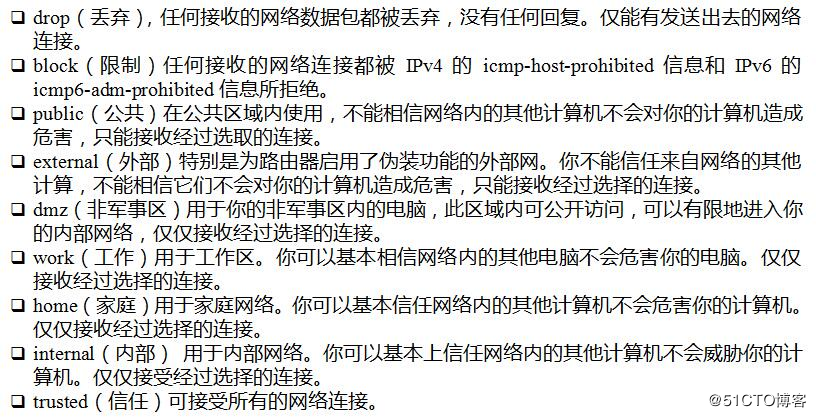
  • 一共9种,常用的就一种public,开放时把所有访问该端口的用户当做公共人员,不完全信任,trusted为完全信任:
    • block dmz drop external home internal public trusted work
    • 下面图片来自博客:https://blog.51cto.com/13503302/2095633
  • 在开放端口时,可以为其添加域(默认为public),不同的域代表不同的信任
域的操作
  • 查看默认zone

    1
    firewall-cmd --get-default-zone
  • 修改默认zone

    1
    firewall-cmd --set-default-zone=public

防火墙与SSH登录

默认启动firewall后,防火墙不会打开22端口[已测试],但为何还能正常ssh登录呢?

1
firewall-cmd --list-all

public
target: default
icmp-block-inversion: no
interfaces:
sources:
services: ssh dhcpv6-client
ports:
protocols:
masquerade: no
forward-ports:
source-ports:
icmp-blocks:
rich rules:

  • 从上面的输出中可以看出来ssh服务默认被开启防火墙了,所以无需开启22端口即可使用ssh指令登录到服务器
  • 同时开启的还有dhcpv6-client服务,这个服务用于ipv6的DHCP服务(为什么ipv4不需要这个服务呢?详情参考问答:https://unix.stackexchange.com/questions/176717/what-is-dhcpv6-client-service-in-firewalld-and-can-i-safely-remove-it )

Linux——查看服务器内核和系统版本

本文主要介绍Linux系统的内核版本和系统版本等信息用命令行如何查看


系统类型和版本

Centos

  • 文件存在表示为Centos

    1
    cat /etc/redhat-release
  • 上述指令同时会输出Centos版本

Ubuntu

  • 命令可以执行表示为Ubuntu

    1
    lsb_release -a
  • 执行下面命令可以看出Ubuntu的版本

    1
    cat /etc/issue

更进一步的内核信息

  • 内核名称

    1
    uname -s
  • 结点名称

    1
    uname -n
  • 内核发行号

    1
    uname -r
  • 处理器类型

    1
    uname -p
  • 操作系统

    1
    uname -o

Ubuntu——自动加载bashrc

本文描述了如何为Ubuntu用户创建默认的/.bashrc并设置自动加载/.bashrc


创建.bashrc

  • 如果.bashrc存在,则无需创建,很多程序安装时可能会自动创建,否则,需要我们复制一个

  • 复制命令

    1
    cp /etc/skel/.bashrc ~/
  • 亲测,无需复制,创建一个新的即可


使.bashrc生效

暂时生效

用户重新登录不会生效

1
source ~/.bashrc

永久生效

用户登录后默认生效

  • 新建或打开文件

    1
    vim ~/.profile
  • 添加下面的语句

    1
    2
    3
    4
    5
    6
    7
    8
    9
    # ~/.profile: executed by Bourne-compatible login shells.

    if [ "$BASH" ]; then
    if [ -f ~/.bashrc ]; then
    . ~/.bashrc
    fi
    fi

    mesg n
  • 保存后退出,以后默认的,我们登录后~/.bashrc即可生效

  • 马上生效~/.profile

    1
    source ~/.profile

Linux——rpm和deb包的区别

Linux系统管理之rpm命令的使用


帮助信息

  • 执行man rpm可获取rpm命令的详细帮助信息

Centos

  • yum是用于安装和管理RPM包的
  • RPM包是一种预先在linux机器上被打包好的文件,文件后缀为.rpm,类似于Ubuntu上的deb

yum和rpm的区别

  • yum和rpm都是管理RPM包的
  • yum可以联网下载需要的RPM包
  • yum自己可以处理依赖

Centos安装deb包

  • 安装alien

    1
    2
    3
    4
    5
    6
    7
    # download alien source code
    # uncompress source code
    tar -zxvf alien_x.xx.tar.gz
    cd alien
    # compile
    make
    make install
  • 转换deb包为rpm包

    1
    2
    # generate a rpm package with name xxx.rpm
    alien -r xxx.deb
  • 安装rpm包

    1
    rpm -ivh xxx.rpm

Ubuntu

  • apt-get是用于管理deb包的

Ubuntu上安装rpm包

  • 安装alien

    1
    sudo apt-get install alien
  • 转换

    1
    2
    # generate a deb package with name xxx.deb
    sudo alien xxx.rpm
  • 安装包

    1
    sudo dpkg -i xxx.deb
  • 说明

    • 不是所有的RPM包都能通过alien成功转换成deb包并成功安装的,能找到deb包的最好使用deb包安装

总结

  • Ubuntu使用deb包(apt-get, dpkg),Centos使用RPM包(yum, rpm)
  • deb包和RPM包可互相转换(使用alien包转换即可)
1…404142…63
Joe Zhou

Joe Zhou

Stay Hungry. Stay Foolish.

630 posts
53 tags
GitHub E-Mail
© 2026 Joe Zhou
Powered by Hexo
|
Theme — NexT.Gemini v5.1.4