注:本文包含 AI 辅助创作
汇总一些暂时没有完整阅读的论文简读结果,部分文章暂时粗读一下,后续有时间再按需补充详细信息
GMPO
问题 & 背景
- GRPO 在训练过程中存在严重的稳定性问题 ,具体表现为:
- 在 GRPO 训练中,每个 Token 的重要性加权奖励为 \( \rho_{i,t}(\theta)\hat{A}_i \),其中重要性采样比定义为:
$$
\rho_{i,t}(\theta) = \frac{\pi_{\theta}(o_{i,t}|q, o_{i,<t})}{\pi_{\theta_{\text{old} } }(o_{i,t}|q, o_{i,<t})}
$$ - 该比值在 PPO 和 GRPO 中扮演关键角色,确保策略更新基于当前策略 \( \pi_{\theta} \) 采样的数据
- \( \rho_{i,t}(\theta) \) 大幅偏离 1 表明策略发生过激偏移,导致过度激进的更新和不稳定性
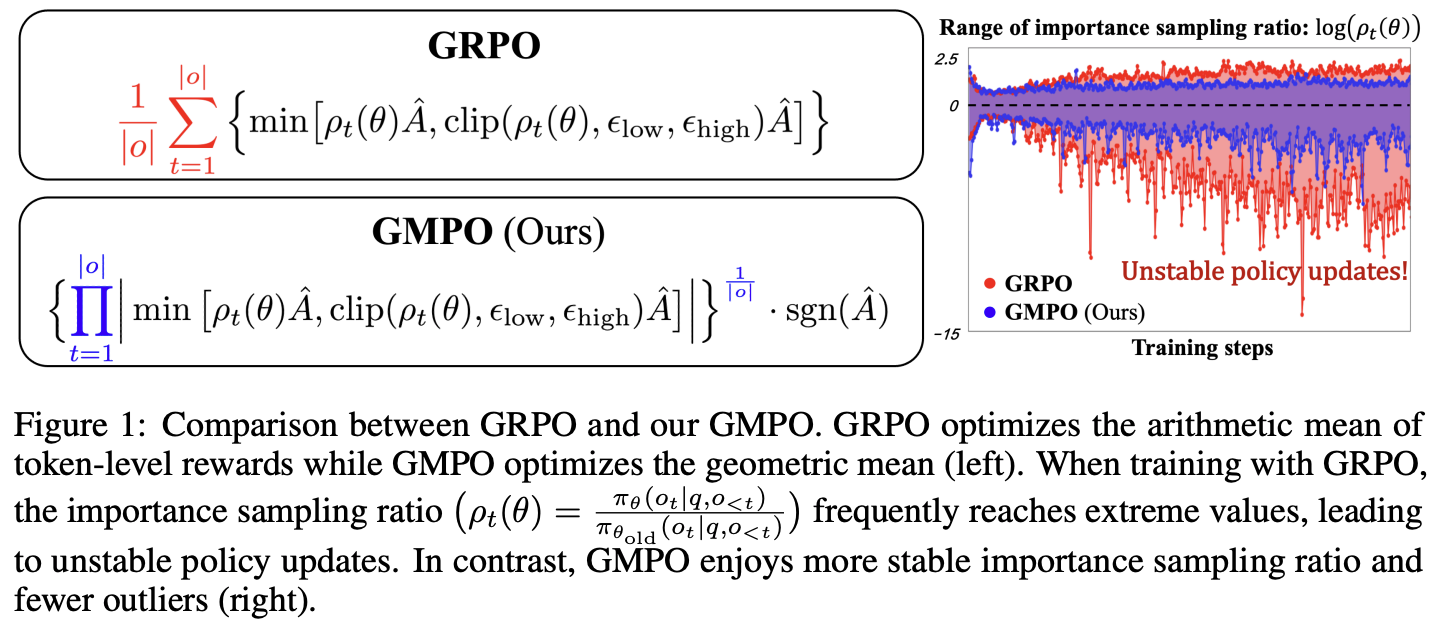
- 如图 1(右)所示,训练 GRPO 时,重要性采样比 \( \rho_{i,t}(\theta) \) 频繁达到极端值,导致策略更新不稳定
- 因为 GRPO 的目标函数对异常值 Outlier 敏感,它优化的是 Token 级别奖励的算术平均值 ,而算术平均值对异常值高度敏感(如图 2 所示)
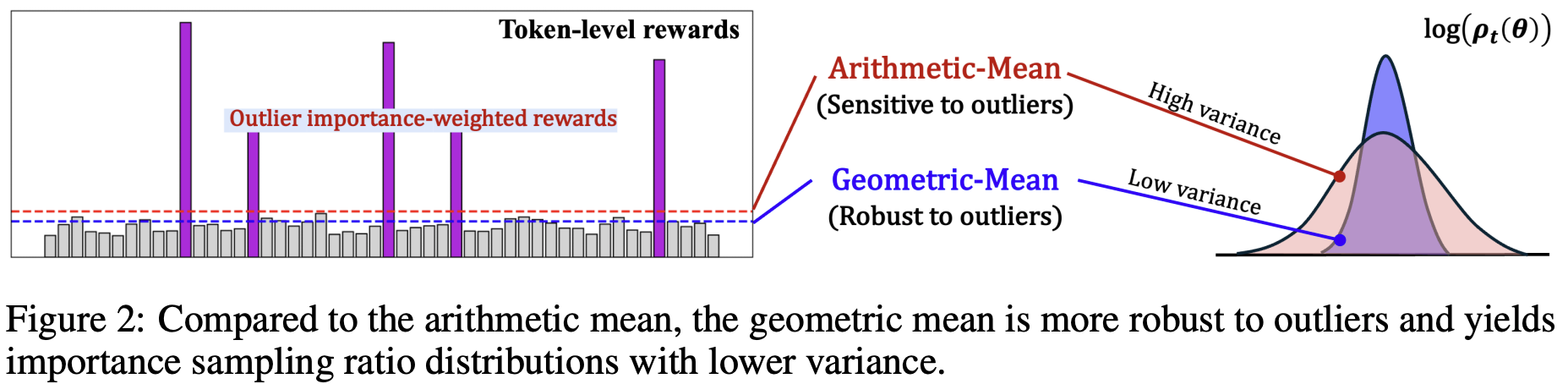
- 在 GRPO 训练中,每个 Token 的重要性加权奖励为 \( \rho_{i,t}(\theta)\hat{A}_i \),其中重要性采样比定义为:
- GRPO 应用了裁剪范围 \( (\epsilon_{\text{low} }, \epsilon_{\text{high} }) \) 来限制 \( \rho_{i,t}(\theta) \) 的大幅偏离,但 DAPO 也指出,这种约束会导致:
- 有限的探索能力 (Limited Exploration)
- 过早的确定性策略 (Early Deterministic Policy)
GMPO 解法
- 本文提出 GMPO ,通过以下方式解决上述问题:
- 1)将 GRPO 的算术平均替换为几何平均(Geometric Mean),后者对异常值具有天然的鲁棒性(图 2)
- 2)采用 Token-Level 裁剪(而非 Sequence-Level 裁剪),并扩大裁剪范围以促进探索
- 3)提供详细的理论和实验分析,证明 GMPO 在稳定性和探索能力方面的优势
- 注:原论文中进行深入的理论和实证分析,表明 GMPO 在提升稳定性的同时增强了探索能力
GMPO 方法
- GRPO 的目标:(为清晰起见)忽略裁剪范围和 KL 正则化项,GRPO 的目标等价于 Token 级别奖励的算术平均:
$$
\mathcal{J}_{\text{GRPO} }^{*}(\pi_{\theta}) = \mathbb{E}_{q\sim \mathcal{Q},\{o_i\}_{i=1}^G\sim \pi_{\theta_{\text{old} } }(\cdot|q)} \left[ \frac{1}{G}\sum_{i=1}^G \frac{1}{|o_i|}\sum_{t=1}^{|o_i|} \rho_{i,t}(\theta)\hat{A}_i \right]
$$ - GMPO 设计思路
- 观察: GRPO 训练期间存在具有极端重要性采样比的 Token,表明策略更新不可靠
- 这种不稳定性源于 GRPO 的目标函数对重要性加权奖励的异常值敏感——异常值驱动激进的策略更新,进一步放大重要性采样比的方差
- GMPO 核心思想是:将 GRPO 的算术平均替换为几何平均
- 观察: GRPO 训练期间存在具有极端重要性采样比的 Token,表明策略更新不可靠
- GMPO 目标函数
- GMPO 最大化 Token 级别奖励的几何平均而非算术平均:
$$
\mathcal{J}_{\text{GMPO} }^{*}(\pi_{\theta}) = \mathbb{E}_{q\sim \mathcal{Q},\{o_i\}_{i=1}^G\sim \pi_{\theta_{\text{old} } }(\cdot|q)} \left[ \frac{1}{G}\sum_{i=1}^G \left( \prod_{t=1}^{|o_i|} |\rho_{i,t}(\theta)\hat{A}_i| \right)^{\frac{1}{|o_i|} } \cdot \text{sgn}(\hat{A}_i) \right]
$$- \( \text{sgn}(\hat{A}_i) \) 确保正确的优化方向:当 \( \hat{A}_i > 0 \) 时返回 1,否则返回 -1
- \( |\cdot| \) 表示绝对值,确保几何平均在正数域定义
- GMPO 最大化 Token 级别奖励的几何平均而非算术平均:
- 为什么几何平均更稳定?
- 几何平均对异常值的鲁棒性优于算术平均
- 对于正数 \( x_1, x_2, \dots, x_n \),几何平均 \( (\prod x_i)^{1/n} \) 受极端值的影响远小于算术平均 \( \frac{1}{n}\sum x_i \)
补充:GMPO vs GRPO 值域收窄分析
- 论文证明 GMPO 的目标函数值域比 GRPO 更窄:
$$
\begin{align}
|\mathcal{J}_{\text{GMPO} }^{*}(\pi_{\theta})| = \mathbb{E}_{q\sim \mathcal{Q},\{o_i\}_{i=1}^G\sim \pi_{\theta_{\text{old} } }(\cdot|q)} \left[ \frac{1}{G}\sum_{i=1}^G \left( \prod_{t=1}^{|o_i|} |\rho_{i,t}(\theta)\hat{A}_i| \right)^{\frac{1}{|o_i|} } \right] \\
\leq \mathbb{E}_{q\sim \mathcal{Q},\{o_i\}_{i=1}^G\sim \pi_{\theta_{\text{old} } }(\cdot|q)} \left[ \frac{1}{G}\sum_{i=1}^G \frac{1}{|o_i|}\sum_{t=1}^{|o_i|} |\rho_{i,t}(\theta)\hat{A}_i| \right] = |\mathcal{J}_{\text{GRPO} }^{*}(\pi_{\theta})|
\end{align}
$$ - 这个不等式成立的关键依据是几何平均-算术平均不等式(AM-GM Inequality) :
- 对于非负实数 \( x_1, \dots, x_n \),有
$$ (\prod x_i)^{1/n} \leq \frac{1}{n}\sum x_i $$
- 对于非负实数 \( x_1, \dots, x_n \),有
- 更窄的值域表明 GMPO 的训练过程在优化目标上具有更低的方差,这是更稳定策略更新的证据
带裁剪的 GMPO 完整目标函数
- 结合 PPO 的 Token 级别裁剪,GMPO 的完整目标函数为:
$$
\mathcal{J}_{\text{GMPO} }(\pi_{\theta}) = \mathbb{E}_{q\sim \mathcal{Q},\{o_i\}_{i=1}^G\sim \pi_{\theta_{\text{old} } }(\cdot|q)} \left[ \frac{1}{G}\sum_{i=1}^G \left\{ \prod_{t=1}^{|o_i|} \left| \min\left[\rho_{i,t}(\theta)\hat{A}_i, \text{clip}(\rho_{i,t}(\theta), \epsilon_{\text{low} }, \epsilon_{\text{high} })\hat{A}_i\right] \right| \right\}^{\frac{1}{|o_i|} } \cdot \text{sgn}(\hat{A}_i) \right]
$$
GMPO 伪代码与实现
GMPO 的实现非常简洁,其伪代码如下:
1
2
3
4
5
6
7
8
9
10
11
12
13
14
15
16
17
18
19
20
21
22
def gmpo_loss(new_probs, old_probs, mask, advantage, epsilon=0.4):
# new_probs [L, 1]: 当前模型的 Token 概率
# old_probs [L, 1]: 旧模型的 Token 概率
# mask [L, 1]: 指示有效(非填充)Token
# advantage [1]: 序列的优势或归一化奖励
# epsilon [1]: 控制裁剪范围
new_log_probs, old_log_probs = torch.log(new_probs), torch.log(old_probs)
sgn = 1.0 if advantage > 0 else -1.0
# 带符号的对数比率
signed_log_ratio = sgn * (new_log_probs - old_log_probs)
# Token 级别裁剪(在 log 空间)
clipped = torch.clamp(signed_log_ratio, -epsilon, epsilon)
min_log_ratio = torch.min(signed_log_ratio, clipped)
min_log_ratio = sgn * min_log_ratio
# 几何平均策略优化
importance_sampling_ratio = torch.exp(min_log_ratio[mask].sum() / mask.sum())
loss = -advantage * importance_sampling_ratio
return loss关键实现细节:
- 1)Log 空间计算 :为了避免数值溢出,乘积和裁剪操作都在对数空间进行
- 2)Token 级别裁剪 :对每个 Token 的带符号对数比率分别进行裁剪,然后取几何平均
- 3)归一化 :\( \frac{1}{|o_i|} \) 的指数确保了与序列长度无关的稳定缩放
梯度分析:为什么 GMPO 更稳定
- 为了从梯度角度理解 GMPO 的稳定性优势,论文推导了 GRPO 和 GMPO 的梯度
- 给定问题 \( q \) 和 Rollout \( o_i \),两个目标的梯度分别为:
- GRPO 梯度:
$$
\nabla_{\theta}\mathcal{J}_{\text{GRPO} }^{*}(\pi_{\theta})\big|_{q,o_i} = \frac{1}{G\cdot |o_i|}\sum_{t=1}^{|o_i|} \rho_{i,t}(\theta)\cdot \hat{A}_i \cdot \nabla_{\theta}\log(\pi_{\theta}(o_{i,t}|q, o_{i,<t}))
$$ - GMPO 梯度:
$$
\nabla_{\theta}\mathcal{J}_{\text{GMPO} }^{*}(\pi_{\theta})\big|_{q,o_i} = \frac{1}{G\cdot |o_i|}\sum_{t=1}^{|o_i|} \left( \prod_{k=1}^{|o_i|} \rho_{i,k}(\theta) \right)^{\frac{1}{|o_i|} } \cdot \hat{A}_i \cdot \nabla_{\theta}\log(\pi_{\theta}(o_{i,t}|q, o_{i,<t}))
$$ - 关键差异:
- 对于 \( \mathcal{J}_{\text{GRPO} }^{*} \),Token \( o_{i,t} \) 的权重是它自身的重要性采样比 \( \rho_{i,t}(\theta) \)
- 一个极端的 \( \rho_{i,t}(\theta) \) 会导致该 Token 的梯度过大或过小,产生激进的策略更新
- 对于 \( \mathcal{J}_{\text{GMPO} }^{*} \),Token \( o_{i,t} \) 的权重是同一序列中所有比值的几何平均
$$ \left( \prod_{k=1}^{|o_i|} \rho_{i,k}(\theta) \right)^{\frac{1}{|o_i|} } $$- 这提供了更平衡的更新信号 ,对异常值更鲁棒
- 对于 \( \mathcal{J}_{\text{GRPO} }^{*} \),Token \( o_{i,t} \) 的权重是它自身的重要性采样比 \( \rho_{i,t}(\theta) \)
补充理论分析:GMPO 是 GRPO 的 Lipschitz 稳定扰动
- 论文在附录中提供了更深层的理论分析,证明在信任域(Trust Region)内,GMPO 是 GRPO 的 \( O(\delta^2) \) Lipschitz 稳定扰动
- 设 \( \rho_{i,t}(\theta) = 1 + \delta_{i,t}(\theta) \),其中 \( \delta_{i,t}(\theta) \) 是 Token 级别的偏差
- 在信任域中假设 \( |\delta_{i,t}(\theta)| \leq \delta \)。则 GMPO 和 GRPO 的差异可以展开为:
$$
\mathcal{J}_{\text{GMPO} }^{*}(\pi_{\theta}) = \mathcal{J}_{\text{GRPO} }^{*}(\pi_{\theta}) - \mathbb{E}\left[ \frac{1}{G}\sum_{i=1}^G \frac{\hat{A}_i}{2} \text{Var}_i(\theta) \right] + O(\delta^3)
$$- 其中:
$$
\begin{align}
\text{Var}_i(\theta) &= \frac{1}{|o_i|}\sum_{t=1}^{|o_i|} \left( \delta_{i,t}(\theta) - \bar{\delta}_i(\theta) \right)^2 \\
\bar{\delta}_i(\theta) &= \frac{1}{|o_i|}\sum_{t=1}^{|o_i|} \delta_{i,t}(\theta)
\end{align}
$$
- 其中:
- 在信任域中假设 \( |\delta_{i,t}(\theta)| \leq \delta \)。则 GMPO 和 GRPO 的差异可以展开为:
- 这表明:
- GMPO 在 GRPO 的基础上引入了一个方差惩罚项 \( \text{Var}_i(\theta) \),这有助于抑制 Token 级别比值的大幅波动
- 当策略更新在信任域内时(\( \delta \) 很小),GMPO 与 GRPO 的差异仅为 \( O(\delta^2) \)
- 因此 GMPO 保留了 GRPO 的单调改进和收敛保证(Bertsekas, 1997)
两个关键设计
(i) Token-Level 裁剪 vs. Sequence-Level 裁剪
- DeepSeek-R1 在序列级别 裁剪 \( \prod_{t=1}^{|o_i|}\rho_{i,t}(\theta) \):
$$
\text{clip}\left( \prod_{t=1}^{|o_i|}\rho_{i,t}(\theta), \epsilon_{\text{low} }, \epsilon_{\text{high} } \right)
$$ - 论文发现 Token 级别裁剪更优 ,原因有二:
- 1)更稳定 :如图 3 所示,序列级别裁剪(GMPO-seq-clip-\( (e^{-0.4}, e^{0.4}) \))的重要性采样范围比 Token 级别裁剪(GMPO \( (e^{-0.4}, e^{0.4}) \))更大,更容易产生极端梯度
- 2)不过度激进 :序列级别裁剪一旦触发,会将序列中所有 Token 的梯度置为零,可能丢弃来自 Rollout 中有信息部分的宝贵更新信号
(ii) 更宽的裁剪范围
- 如 DAPO 所指出,裁剪操作会限制探索并导致过早的确定性策略
- 为了在保持稳定性的同时鼓励探索,论文将裁剪范围 \( (\epsilon_{\text{low} }, \epsilon_{\text{high} }) \) 设置为 \( (e^{-0.4}, e^{0.4}) \),这显著大于 GRPO 的 \( (0.8, 1.2) \) 和 DAPO 的 \( (0.8, 1.28) \)
- 实验观察(图 1 右):
- 1)GRPO 训练过程中,重要性采样比范围逐渐扩大,表明策略更新越来越激进
- 2)GMPO 保持了更窄的重要性采样比范围,表明更新更稳定
- 3)对于 GMPO,将裁剪范围从 \( (e^{-0.2}, e^{0.2}) \) 扩大到 \( (-\infty, +\infty) \) 会增加不稳定性
实验
- 模型选择
- 语言推理(≤7B):Qwen2.5-Math-1.5B, Qwen2.5-Math-7B, DeepSeek-R1-Distill-Qwen-7B
- 语言推理(MoE) : Qwen3-32B
- Agentic 推理 : Qwen2.5-Instruct-1.5B
- 多模态推理 : Qwen2.5-VL-Instruct-7B
- 任务设置:
- 语言任务(遵循 Dr.GRPO):
- 训练数据:MATH Levels 3-5(8,523 个数学问题)
- 每个问题生成 8 个 Rollout
- 最大 Response 长度:3,000 Token
- 每轮 RL 训练:旧策略产生 1,024 个 Rollout,当前策略更新 8 次
- Batch Size:128
- MoE 模型 :
- 训练数据:DeepScaleR(约 40,000 个数学问题-答案对)和 CountDown(算术谜题)
- 详细设置在附录 E
- 多模态任务(遵循 EasyR1):
- 训练数据:Geometry3K
- Agentic 任务(遵循 GiGPO):
- 训练环境:ALFWorld(3,827 个任务实例,6 个类别)
- 语言任务(遵循 Dr.GRPO):
- 实验结果:
- GMPO-7B(R1-Distill)平均提升 4.1%(59.3% → 63.4%)
- GMPO 在 AMC 和 OlympiadBench 上提升尤为显著
- GMPO 在 Geometry3K 上提升 1.4%,证明了其在多模态任务中的泛化能力
- GMPO 在 MoE 模型上提升 2.1%,证明了其在稳定性敏感的模型架构上的优势
- GMPO 在 ALFWorld 上实现了 13.1% 的性能提升,在所有 6 个类别上均优于 GRPO,特别是在 Look(+24.9%)、Cool(+22.4%)和 Pick2(+36.0%)上提升显著
CoRT
- 原始论文:CoRT: Counterfactual Replay for Token-Level Rubric-Guided Policy Optimization, 20260728
- CoRT 针对的核心场景是 Rubric-Guided 指令遵循场景
- CoRT 的核心设计思路是:保持 Rollout、Verifier 奖励和 Response 级别的更新方向不变,仅通过反事实重放(Counterfactual Replay)重新分配 Advantage 在不同 Token 上的权重
- 它不改变奖励定义,也不引入单独的学习模型(需要多一次 forward 计算权重)
- 思想:因为只有 “依赖 Rubrics 的 Token” 才是导致最终 Response 获得高分或低分的“原因”,所以加大这部分 Token 的奖励或惩罚(不改变方向,只加大幅度)
GRPO 方法的表达式
- 设指令为 \(x\),Rubric 标准为 \(c\),则完整 Prompt 为 \(x^{+} = (x, c)\),去除 Rubric 的反事实 Prompt 为 \(x^{-} = x\)
- 对于旧策略 \(\pi_{\theta_{\text{old} } }\) 采样的 \(G\) 个 Responses \(\{y_i\}_{i=1}^G\),Rubric 验证器给出标量奖励 \(r_i\),GRPO 将其转换为组内相对 Advantage:
$$
A_i = \frac{r_i - \mu}{\sigma + \epsilon_r}
$$- \(\mu\) 和 \(\sigma\) 是该组奖励的均值和标准差,\(\epsilon_r\) 为防止除零的常数
- 对于 Response \(y_i\) 中的第 \(t\) 个 Token,策略比率定义为:
$$
\rho_{i,t}(\theta) = \frac{\pi_{\theta}(y_{i,t} \mid x^{+}, y_{i,< t})}{\pi_{\theta_{\text{old} } }(y_{i,t} \mid x^{+}, y_{i,< t})}
$$ - 经过 Clip 后得到
$$ \bar{\rho}_{i,t}(\theta) = \text{clip}(\rho_{i,t}(\theta), 1 - \epsilon_{\text{clip} }, 1 + \epsilon_{\text{clip} })$$ - 标准的 GRPO 损失函数为:
$$
\mathcal{L}_{\text{GRPO} } = -\mathbb{E}_{i,t}\left[\min (\rho_{i,t}A_i,\bar{\rho}_{i,t}A_i)\right]
$$- 注:这里的 \(A_i\) 对于 Response 内的所有 Token 都是相同的
反事实评分(Counterfactual Scoring)
- 对于每个采样得到的 Response \(y_i\),CoRT 在冻结的当前策略 \(\bar{\theta}\)(即旧策略)下,计算两组 Log 概率:
- 事实(Factual)概率:在有 Rubric 的完整 Prompt 下生成该 Token 的 Log 概率
$$
\ell_{i,t}^{+} = \log \pi_{\bar{\theta} }(y_{i,t} \mid x_{i}^{+}, y_{i,< t})
$$ - 反事实(Counterfactual)概率:在去除 Rubric 的 Prompt 下生成该 Token 的 Log 概率(此步需要额外的前向传播,但无需生成新 Token)
$$
\ell_{i,t}^{-} = \log \pi_{\bar{\theta} }(y_{i,t} \mid x_{i}^{-}, y_{i,< t})
$$
- 事实(Factual)概率:在有 Rubric 的完整 Prompt 下生成该 Token 的 Log 概率
- 随后,计算 Replay 对比度(Contrast):
$$
\Delta_{i,t} = \ell_{i,t}^{+} - \ell_{i,t}^{-}
$$ - 由于前缀和目标 Token 完全固定,\(\Delta_{i,t}\) 的大小直接反映了该 Token 的生成在多大程度上依赖于 Rubric 上下文
- 正值越大,表明该 Token 对 Rubric 的依赖越强(如格式标记)
- 接近零或负值则表示该 Token 是通用内容,不受 Rubric 影响
Replay-Margin Token Credit(映射为有界分数)
- 原始的 \(\Delta_{i,t}\) 是无界的,且可能存在长尾分布,不能直接作为权重
- CoRT 通过 Sigmoid 函数将其映射到一个有界的分数 \(s_{i,t}\):
$$
s_{i,t} = \text{sigmoid}(\tau (\Delta_{i,t} - b)) - \frac{1}{2}
$$- \(b\) 是中心化偏移量(通常设为 0)
- \(\tau\) 控制 Sigmoid 的锐度
- 此时 \(s_{i,t} \in (-0.5, 0.5)\)
- 接着,构造临时的 Token 权重:
$$
\tilde{w}_{i,t} = 1 + \eta \lambda_{k} s_{i,t}
$$- \(\eta\):控制整体加权强度(默认 0.5),使得临时权重范围在 \((1 - \frac{\eta\lambda_k}{2}, 1 + \frac{\eta\lambda_k}{2})\) 内
- \(\lambda_k\):调度系数(Schedule Coefficient),用于后续的渐进式引入
调度式 Response 归一化(Scheduled Response Normalization)
- 为了防止训练早期不稳定,CoRT 引入了 SmoothStep 调度机制
- 设当前 Trainer Step 为 \(k\),预热步数为 \(k_0\),Ramp 长度为 \(K\),则归一化进度为:
$$
\begin{align}
u_{k} &= \text{clip}\left(\frac{k - k_{0} }{K}, 0, 1\right), \\
\lambda_{k} &= 3u_{k}^{2} - 2u_{k}^{3}
\end{align}
$$- 该调度函数确保了 \(\lambda_k\) 从 0 平滑过渡到 1,且在起点和终点处斜率为零,使得 Token 级加权在 Rollout 和 Reward 统计稳定后才逐渐引入
- 为了保持 Response 级别的总更新幅度不变,进行 Response 内归一化 :
$$
\bar{w}_{i} = \frac{1}{T_i}\sum_{t = 1}^{T_i}\tilde{w}_{i,t}, \quad w_{i,t} = \frac{\tilde{w}_{i,t} }{\bar{w}_{i} }
$$- \(T_i\) 是 Response \(y_i\) 的长度,由此保证:
$$
\frac{1}{T_i}\sum_{t = 1}^{T_i} w_{i,t} = 1, \quad \frac{1}{T_i}\sum_{t = 1}^{T_i} w_{i,t} A_i = A_i
$$ - 这确保了 Advantage 的总均值在 Response 级别上保持不变,仅仅是重新分配
- \(T_i\) 是 Response \(y_i\) 的长度,由此保证:
最终 Policy 目标函数
- 最终 CoRT 构造 Token 级 Advantage:
$$
\hat{A}_{i,t} = \text{sg}(w_{i,t}) A_i
$$- \(\text{sg}(\cdot)\)(Stop Gradient)阻止梯度回传至权重计算分支,防止权重本身被 Policy 更新所影响
- 将 Token 级 Advantage 代入标准的 Clipped Surrogate 目标:
$$
\begin{align}
g_{i,t}(a) = \min (\rho_{i,t}a,\bar{\rho}_{i,t}a) \\
\mathcal{L}_{CoRT} = -\mathbb{E}_{i,t}\left[g_{i,t}(\hat{A}_{i,t})\right]
\end{align}
$$ - 设计思路总结 :
- \(w_{i,t}\) 控制更新的大小(Credit),而原始的组相对 Advantage \(A_i\) 控制更新的方向(强化或抑制)
- 若 \(A_i > 0\)(好 Response),则依赖 Rubric 的 Token 获得更大的正向更新
- 若 \(A_i < 0\)(坏 Response),则依赖 Rubric 的 Token 被更强烈地抑制
- 理解:依赖 Rubric 的 Token 本身
- \(w_{i,t}\) 控制更新的大小(Credit),而原始的组相对 Advantage \(A_i\) 控制更新的方向(强化或抑制)
实验
- 实验设置:
- 训练数据 :HIR-16k,包含 Prompt 和对应的 Instruction List,天然适配 CoRT 所需的 \(x^+\) 和 \(x^-\) 构造
- 奖励模式 :
- CSR(Constraint Satisfaction Rate) :即满足标准的比例
$$ r_{\text{CSR} } = \frac{1}{M}\sum_{j=1}^{M}z_j $$ - AON(All-or-Nothing) :仅当全部满足时奖励为 1
$$ r_{\text{AON} } = \mathbf{1}[\sum z_j = M] $$
- CSR(Constraint Satisfaction Rate) :即满足标准的比例
- 模型 :Qwen3-4B-Instruct,Qwen2.5-7B-Instruct,Qwen3-14B
- 基线 :SFT,DPO,GRPO,以及最接近的 Token 级方法 RTT(Rubrics-to-Tokens)
- 同时测试了与 DAPO、GSPO 的兼容性
- 评估基准 :IFBench,IFEval,MultiDimIF,AdvancedIF
- 主要结果与分析
- 1)对比 GRPO 的提升 :在绝大多数对比中,CoRT 在相同 Reward 设置下一致优于 Response 级 GRPO,平均提升达 4.4 个百分点
- 这表明将结构化监督信号用于 Token 级分配能显著提升指令遵循能力
- 2)对比 RTT(Learned Token Relevance) :CoRT 在与 RTT 的比较中表现相当甚至更强
- 这证明了无需昂贵的额外训练阶段(RTT 需要构建 Token 级相关性监督数据),仅凭 Policy 内部的 Counterfactual Likelihood Contrast 即可达到甚至超越专门学习的 Token 相关性判别器
- 3)扩展到更大模型(14B)与兼容性 :
- 在 Qwen3-14B 上,CoRT 在 CSR 下全面超越 GRPO,在稀疏的 AON 奖励下,多数指标提升(IFEval 略降)
- 将 CoRT 集成到 DAPO 和 GSPO 中,结果显示在几乎所有指标上均有提升,证明了其作为通用 Credit 分配插件的有效性
- 1)对比 GRPO 的提升 :在绝大多数对比中,CoRT 在相同 Reward 设置下一致优于 Response 级 GRPO,平均提升达 4.4 个百分点
补充:论文中的其他 Insight
训练稳定性诊断(Integration Ablations)
- 论文通过消融实验分析了两个核心稳定组件的必要性(见图 3、图 4、表 10):
- Response Normalization :去除后,平均 Token 权重会向上漂移(接近 1.04),导致长度裁剪激增、梯度范数和熵急剧上升
- 这表明归一化主要控制更新尺度,防止其演变为 Response 级乘数
- SmoothStep Ramp :去除后,虽然权重均值受归一化控制,但突然引入的 Token 级加权仍会导致后期梯度和熵的峰值
- Response Normalization :去除后,平均 Token 权重会向上漂移(接近 1.04),导致长度裁剪激增、梯度范数和熵急剧上升
- 结论 :两者协同工作,缺失任何一个都会导致训练动态恶化
- 只有完整版 CoRT 在 500 Step 附近保持了最强的验证平均值和最高的训练 Reward
Failure-Mode Diagnostics
- 论文测试了一个“仅扰动”变体(CoRT-only perturbation),即去掉 GRPO 的 Advantage 方向,仅依赖 Contrast 进行更新
- 结果显示该变体训练 Reward 较低且长度裁剪更大,最终被提前终止
- 这验证了 :CoRT 是作为现有 Advantage 的信用分配器 ,而非独立的训练信号
- 组相对 Advantage 提供的 Reward 方向是模型优化的锚点
Replay 案例研究与控制实验(确保信号有效性)
- 标准案例 :在“运动员饮食”和“疫情经济”Prompt 中,高对比度的 Token 精确对应了 Rubric 中的显式要求(如引号、Markdown 标记
*、指定关键词P.S.、固定结尾等) - 匹配上下文控制(Matched Context Controls) :将去除 Rubric 替换为相同长度的中性填充文本或其他 HIR 标准
- 结果显示,显式受控 Token 的平均对比度依然远高于其他 Token
- 这说明信号并非仅由 Prompt 长度变化或存在“Instruction 块”引起
- 逐标准移除 :每次只移除一条标准
- 例如:
- 移除“恰好两个 Bullet Point”标准后,高对比度 Token 集中在
-和point上 - 移除“高亮 Span”标准后,高对比度 Token 集中在
*和highlight上
- 移除“恰好两个 Bullet Point”标准后,高对比度 Token 集中在
- 这证明了 Contrast 捕捉到了特定 Rubric 标准的局部因果效应,而全局标准(如“至少 5 句话”)则影响较为弥散
- 例如:
通用能力保持(General Capability Checks)
- 论文在 Math500、GPQA Diamond 和 MMLU-Pro 上进行了评估(表 5)
- 结果表明,CoRT 在提升指令遵循能力的同时,几乎不损害模型在数学和通用知识方面的能力(Delta 波动很小)
与 Self-OPD(Online Policy Distillation)的关系讨论
- 论文明确指出 CoRT 与 Self-OPD 类方法(如 TRACE)有本质区别:
- Self-OPD 依赖特权答案轨迹(Privileged Answer Trace)或外部目标分布进行蒸馏
- CoRT 不使用任何特权信息或跨度标注 ,它仅仅固定采样 Response,移除 Rubric Prompt,并将无 Rubric 的 Log 概率作为背景似然基线
- 最终,这个对比度信号乘以有符号 的 GRPO Advantage
- 这使其更接近于“有符号反事实对比塑形(Signed Counterfactual Contrast Shaping)”,而非蒸馏
- 理解:两者的核心变量不同
- Self-OPD 使用的是一些结果性的信息作为 hint,区分插入 hint 前后的 Token 概率差异,从而让模型无 hint 时的输出 Token 更贴近带 hint 的
- CoRT 则是使用指令遵循的 Rubrics 作为变量,区分插入 Rubrics 前后的 Token 概率差异,从而识别出受 Rubrics 影响最大的 Token
GRPO-as-a-PRM, lambda-GRPO, λ-GRPO, \(\lambda\)-GRPO
- 原始论文:(GRPO-as-a-PRM & lambda-GRPO, λ-GRPO, \(\lambda\)-GRPO)GRPO is Secretly a Process Reward Model, 20250925-20260528, ICML 2026, Saarland University
- 文章关键字:GRPO-as-a-PRM & lambda-GRPO, λ-GRPO, \(\lambda\)-GRPO
- 最核心的贡献:
- 论文首次从理论和实证上证明,GRPO 算法虽然仅使用 ORM(即对整个 Response 给一个总奖励),但其内部实际上隐式地等价于一个使用了 PRM(即对推理过程的每个步骤给奖励) 的 RL 目标
- 论文揭示了 GRPO 目标函数中的一个固有缺陷:它内部的 PRM 结构会导致 Exploration 和 Exploitation 的不平衡
- 为了修正这个缺陷,论文提出了一个简单而有效的改进算法 \(\lambda\)-GRPO ,通过在 Loss 中引入一个 Process-step-aware 的归一化因子,显著提升了模型在多步推理任务上的性能和训练速度
- 注:本文涉及到许多新的定义和公式,后续进一步阅读时需要详细阅读才行
GRPO 算法回顾
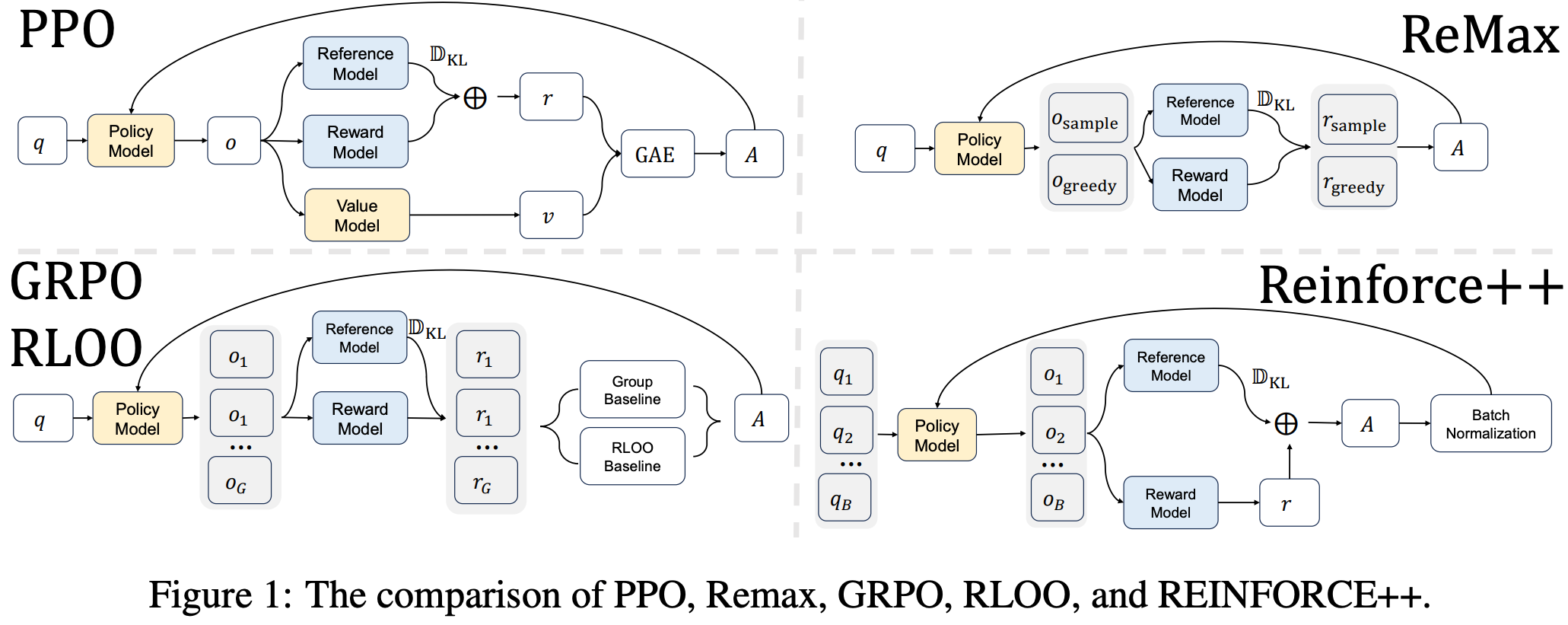
- GRPO 摒弃了 PPO 中的 Critic 模型和 GAE,采用组内相对奖励来计算 Advantage
- 计算每个 Response 的 Advantage \( a_i \):
$$
a_i = \frac{r^{(i)} - r_{\text{mean} }(\mathbb{G})}{r_{\text{std} }(\mathbb{G})}
$$- \( r^{(i)} \) 是第 \( i \) 个 Response 的 Outcome Reward(结果奖励)
- \( r_{\text{mean} }(\mathbb{G}) \) 和 \( r_{\text{std} }(\mathbb{G}) \) 分别是该 Group 内所有 Response 奖励的均值和标准差
- GRPO 的 Loss 函数定义为:
$$
L_{\text{GRPO} }(\mathbb{G}) = \frac{1}{\sum_{y^{(i)}\in\mathbb{G} } \text{len}(y^{(i)})} \sum_{y^{(i)}\in\mathbb{G} } \sum_{t = 0}^{\text{len}(y^{(i)}) - 1} \left( P_{i,t} \cdot a_i - D_{i,t} \right)
$$- \( P_{i,t} = \frac{\pi_\theta(y^{(i)}_t | x, y^{(i)}_{:t})}{\pi_{\theta_{\text{old} } }(y^{(i)}_t | x, y^{(i)}_{:t})} \) 是当前策略与旧策略的概率比(Policy Ratio)
- \( D_{i,t} \) 是 KL 散度惩罚项,用于约束策略更新幅度
- 注意:本论文的两个假设(为了简化理论分析):
- 1)使用 DAPO 提出的 Token-level 策略梯度目标(而非 Sample-level Loss)
- 2)假设每个 Batch 只进行一次更新(\( \mu = 1 \))
- 此时 \( P_{i,t} = 1.0 \),可以忽略 Clipping 项
- 在这两个假设下,GRPO Loss 可以简化为上述公式,其中每个 Token 的梯度都被相同的 Advantage \( a_i \) 加权,表面上,GRPO 是 Token-level 的均匀 Credit Assignment
Process Reward Models (PRMs) 回顾
- PRM 的形式化定义:PRM 是一个函数
$$ f_\phi: \Sigma^* \to (\Sigma^* \times \mathbb{R})^* $$- PRM 将一个完整的轨迹 \( y^{(i)} \) 映射到一个由 (子轨迹, 步骤奖励) 组成的序列
- PRM 与 ORM 的区别在于,ORM 可以看作 PRM 的一个特例,即只包含一个步骤(整个轨迹)的 PRM
- PRM 的关键在于如何划分“步骤”(例如通过 ReAct 风格的分隔符或启发式方法)
核心理论:GRPO 的隐式 PRM
- 本节目标:证明 GRPO 本质上是一个 PRM
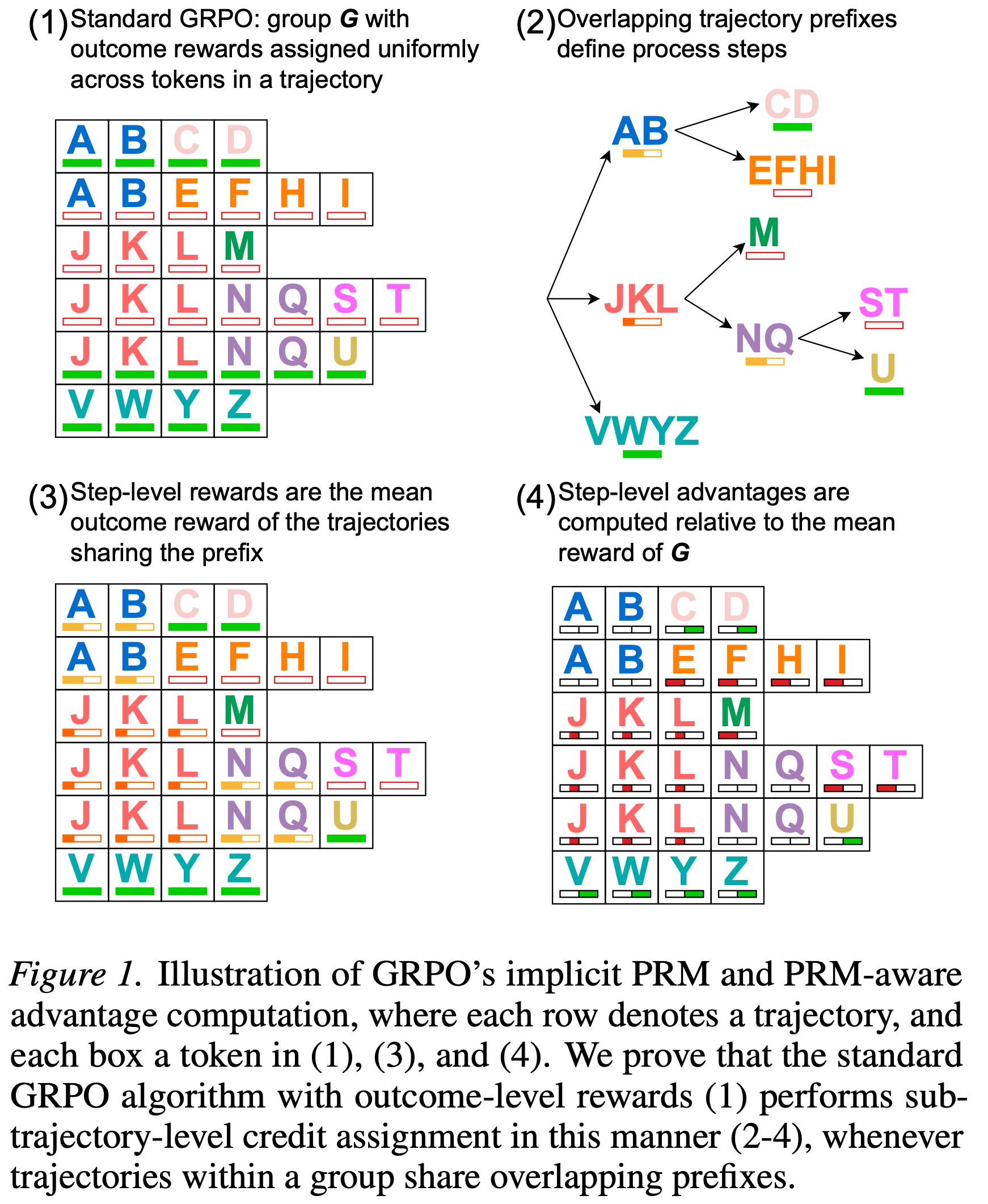
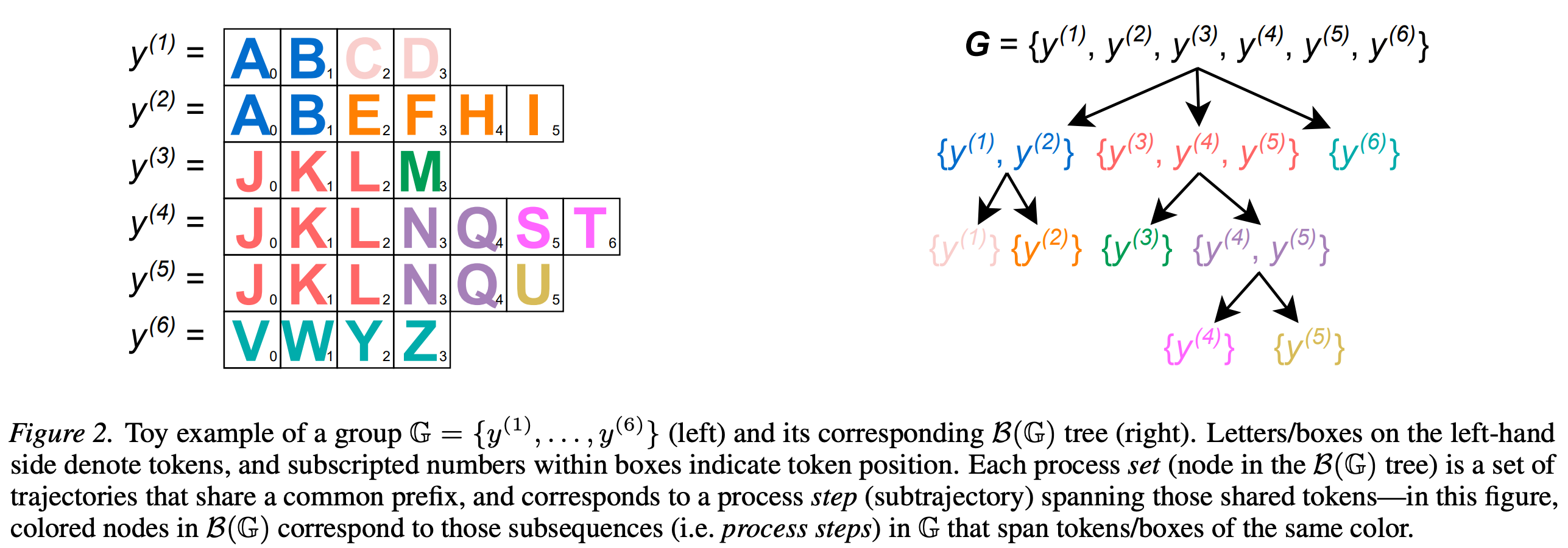
理论分析
- 论文构建了一个概念性的数据结构 \( \mathcal{B}(\mathbb{G}) \)
- \( \mathcal{B}(\mathbb{G}) \) 是一棵前缀树(Prefix Tree) ,用于表示 Group 内所有轨迹共享的前缀结构
- Process Set \( \lambda \) :\( \mathcal{B}(\mathbb{G}) \) 中的一个节点,代表一组共享相同前缀的轨迹
- 例如,\( \lambda = \{y^{(3)}, y^{(4)}, y^{(5)}\} \) 表示这三条轨迹的前 N 个 Token 完全相同
- 理解,在这个节点上挂着的所有轨迹,他们之前的 Token 都是相同的(因为他们按照 Token 挂在同一个节点下)
- Process Step :每个 \( \lambda \in \mathcal{B}(\mathbb{G}) \) 定义了一个 Process Step,即该节点对应的共享子轨迹(Sub-trajectory),从 \( s(\lambda) \) 到 \( e(\lambda) \)
- \( e(\lambda) \)(终点 index):该共享前缀的最大长度
- \( s(\lambda) \)(起点 index):父节点的 \( e(\lambda) \),即父节点的起点 token index
$$
\begin{align}
e(\lambda) &= \max \{ n \ge 0 \mid \forall y^{(i)}, y^{(k)} \in \lambda : y_{n}^{(i)} = y_{n}^{(k)} \} \\
s(\lambda) &= \begin{cases}
0 & \text{if } \lambda = \mathbb{G} \text{ or }\lambda \in \mathbb{G}\text{ as root} \\
e(Pa_{\mathcal{B}(\mathbb{G})}(\lambda)) & \text{otherwise}
\end{cases} \tag{4}
\end{align}
$$
- 隐式 PRM 的构建 :定义一个新的 PRM \( f \),对于轨迹 \( y^{(i)} \) 中的每个 Process Step(即 \( \lambda \) 对应的共享子轨迹),其奖励 \( r_{\text{mean} }(\lambda) \) 定义为该 Process Set 中所有轨迹的 Outcome Reward 的均值:
$$
r_{\text{mean} }(\lambda) = \text{mean}(\{r^{(i)}\}_{y^{(i)}\in \lambda})
$$ - PRM-aware RL Objective :进一步定义一个新的 Advantage \( A_{i,t} \) 用于 Token-level 的信用分配:
$$
A_{i,t} = \frac{R_{i,t} - r_{\text{mean} }(\mathbb{G})}{r_{\text{std} }(\mathbb{G})}
$$- \( R_{i,t} \) 是 Token \( y^{(i)}_t \) 所属 Process Step 的 PRM 奖励(即 \( r_{\text{mean} }(\lambda) \))
- Theorem 1(核心定理) :标准 GRPO 的 Loss \( L_{\text{GRPO} } \) 与上述 PRM-aware 的 Loss \( L_{\text{PRM} } \) 完全等价
$$
L_{\text{GRPO} }(\mathbb{G}) = L_{\text{PRM} }(\mathbb{G})
$$- 证明思路 :对于共享前缀的 Process Set \( \lambda \),由于其中的所有轨迹在当前 Token 位置 \( t \) 上的 Token 和概率比完全相同,GRPO 对它们的梯度贡献总和与 PRM 对该 Process Step 的梯度贡献在数学上是相等的
- 简单来说:GRPO 并不是简单地将一个 Response 的奖励平均分配给每个 Token,而是将共享相同前缀的多个 Response 的奖励聚合起来,共同决定该前缀的梯度方向
实证分析
- 为了证明上述隐式 PRM 在实践中的意义,论文在真实的数学推理训练中统计了 \( \mathcal{B}(\mathbb{G}) \) 树的结构
- Path Depth(路径深度) :衡量前缀共享的复杂程度
- Intermediate Proportion(中间比例) :衡量有多少 Token 属于非叶子节点(即存在共享前缀)
- 实验结果显示:
- 1)99.8% (Group size=6)和 100% (Group size=36)的 Group 都产生了 non-trivial PRM 结构(即存在前缀重叠)
- 2)随着训练的进行(奖励饱和),路径深度和中间比例急剧增加,说明模型在收敛时会产生越来越复杂的共享前缀结构,从而激活了丰富的 PRM 信号
\(\lambda\)-GRPO 方法
- 基于发现:GRPO 内部隐含 PRM,论文进一步分析了该隐式 PRM 的缺陷,并提出了修正方案
问题陈述:Imbalanced Process Step Frequency(过程步骤频率不平衡)
- 将 GRPO Loss 按 Process Set 重新组织后,可以得到:
$$
L_{\text{GRPO} }(\mathbb{G}) \propto \sum_{t=0}^{t_{\text{max} } - 1} \sum_{\lambda \in \mathbb{X}_t} |\lambda| \cdot \left( \hat{P}_t(\lambda) \cdot \hat{A}(\lambda) - \hat{D}_t(\lambda) \right)
$$- \( |\lambda| \) 是该 Process Set 中轨迹的数量
- \( \hat{A}(\lambda) \) 是该 Process Step 的 Advantage
- \( \hat{P}_t(\lambda) \) 是重要性比例(PPO 概率比)
- \( \hat{D}_t(\lambda) \) 表示 KL 散度惩罚
- \( \mathbb{X}_t \subseteq \mathcal{B}(\mathbb{G})\) 是 \(\{ y^{(i)} \in \mathbb{G} | len(y^{(i)}) \leq t \} \) 的一个 partition,有:
$$ \mathbb{X}_t = \{\lambda \in \mathcal{B}(\mathbb{G}) | len(y^{(i)}) \leq t \}$$
- 问题核心 是:每个 Process Step 对 Loss 的贡献被其轨迹数量 \( |\lambda| \) 放大了
- 如果 \( \hat{A}(\lambda) > 0 \)(正向步骤) :频率越高的前缀会被过度强化,导致策略迅速坍缩到这些高频路径上,损害探索(Exploration)
- 个人理解:这个差异是不是本就该有的呢?
- 如果 \( \hat{A}(\lambda) < 0 \)(负向步骤) :即使该前缀中包含得分最高的轨迹(例如图 2 中的 \( y^{(3)} \) 得了满分,但因为共享该前缀的 \( y^{(4)}, y^{(5)} \) 得分低,导致整体均值低),该前缀也会被过度惩罚,导致模型放弃高 Reward 路径,损害利用(Exploitation)
- 个人理解:这不是应该的吗?因为这个前缀不一定能带来正向分数,所以给与适当的惩罚更合适,除非当前组只有这个前缀没有其他前缀,那么在 GRPO 中按照 token-mean 组织 loss_agg 时,得到的结果会是相同 prefix 的所有 Token 梯度贡献和为 0
- 如果 \( \hat{A}(\lambda) > 0 \)(正向步骤) :频率越高的前缀会被过度强化,导致策略迅速坍缩到这些高频路径上,损害探索(Exploration)
\(\lambda\)-GRPO 的设计思路 & 方法流程
- 设计思路:在计算 Loss 时,对样本 \(i\) 的 Token \(t\) 的梯度贡献除以它所属 Process Set 的大小 \( |\lambda^{(i,t)}| \),从而消除频率项 \( |\lambda| \) 的影响 ,使得每个 Process Step 对总 Loss 的贡献是平等的
- 注:\( |\lambda^{(i,t)}| \) 是轨迹数量,即样本 \(i\) 截止到 Token \(t\) 所在的前缀的集合数量
- 理解:GRPO 中,理论上只有相同的 Prompt 会有相同前缀产生, 所以仅根据相同前缀来工作即可
- 理解:前面的 Token 大概率都是相同的,所以除以的是 rollout_n,最后的 Token 大概率都是不相同的,所以除以的是 1
- 可能会导致越靠前的 Token,被关注的越小,这个要小心!但是思路上似乎又没问题,因为前面的 Token 一般是大家都一样的,差异不大,不用学?
- \(\lambda\)-GRPO 详细方法流程 :
- 1)构建 \( \mathcal{B}(\mathbb{G}) \) 树 :对于当前 Group 中的所有轨迹,构建前缀树
- 2)确定 Token 归属 :对于轨迹 \( y^{(i)} \) 中的第 \( t \) 个 Token,找到其所属的 Process Set \( \lambda^{(i,t)} \)(即该 Token 处于哪个共享前缀段内)
- 3)计算缩放因子 :计算该 Process Set 的基数 \( |\lambda^{(i,t)}| \)
- 4)修改 Loss 计算 :将原始的 GRPO Loss 除以该缩放因子
$$
L_{\lambda \text{-GRPO} }(\mathbb{G}) = \frac{1}{\sum_{y^{(i)}\in \mathbb{G} } \text{len}(y^{(i)})} \cdot \sum_{y^{(i)}\in \mathbb{G} } \sum_{t = 0}^{\text{len}(y^{(i)}) - 1} \frac{(P_{i,t} \cdot a_i) - D_{i,t} }{|\lambda^{(i,t)}|}
$$
- 对 \(\lambda\)-GRPO 的理解:
- 这是一种 Process-step-level 的 Normalization(归一化)
- 它防止了高频共享前缀在梯度更新中占据主导地位,使得低频但潜在优质的前缀也有机会被优化
- 计算开销极低(\( \mathcal{O}(k^2 n) \),但由于常数因子小,实际训练时间几乎无增加),实测在 CPU 上每个 Token 仅需 \( 1.2 \times 10^{-7} \) 秒
合成实验验证(虚构的实验)
- 为验证 \(\lambda\)-GRPO 的有效性,论文设计了深度为 4 的二叉树环境
- 目标路径 \( T \) 获得最高奖励 \( +1.0 \)
- 与 \( T \) 共享前 \( n \) 步的路径(除 \( T \) 外)被给予负奖励 \( r_{\text{neg} } \)
- 其他路径获得中等正奖励 \( +0.7 \)
- 实验结果(表 1 和图 5):
- 在所有配置(\( n \in \{1,2\}, r_{\text{neg} } \in \{-0.5, -1.0, -1.5\} \))下,\(\lambda\)-GRPO 在最后 50 步生成目标路径的频率显著高于标准 GRPO(例如,在 \( n=1, r_{\text{neg} }=-1.0 \) 时,\(\lambda\)-GRPO 频率为 0.75,GRPO 为 0.0)
- 实验证实,GRPO 在早期能够发现高奖励路径,但无法利用它(因为共享前缀的负奖励拖累了整个前缀的梯度),而 \(\lambda\)-GRPO 成功解决了这个问题
真实场景实验
- 实验设置
- 基座模型 :DeepSeek-R1-Distill-Qwen-1.5B 和 Llama-3.2-1B-Instruct
- 训练数据集 :OpenRS(结合了 s1 和 DeepScaleR 的数学推理数据集)
- 评估基准 :AIME24, MATH-500, AMC23, Minerva, OlympiadBench
- 对比组 :Base Model(基座模型)、Standard GRPO、\(\lambda\)-GRPO(论文方法)。KL 系数 \( \beta \) 测试了 0.0 和 0.04
- 主要结果(表 2 和图 6)
- 性能提升 :\(\lambda\)-GRPO 在 15/20 个评估单元(不同模型、不同 \(\beta\)、不同数据集)上超过了标准 GRPO,并且在 14/20 个单元上超过了基座模型
- 训练加速 :\(\lambda\)-GRPO 的验证准确率达到峰值所需的步数不到标准 GRPO 的一半(平均减少超过 50% 的步数),且峰值准确率平均高出 10% 以上
- 鲁棒性 :即使在某些配置下平均性能略逊(如 Llama \(\lambda\)=0.04),\(\lambda\)-GRPO 在大多数单项任务上依然表现更好
RLVP
整体说明
- RLVP 在解决特殊 Agent 场景的问题:可部署性(Deployability)取决于“过程(Path)”,而不只是“结果(Outcome)” 的场景
- 比如训练一个 AI 帮你打电话处理银行账单(论文里的 Phone Agent)
- 困境 1(只看结果不行) :AI 确实把钱要回来了(Outcome 成功 ),但它是半夜 3 点打的、绕过了银行身份验证,这是不行的
- 困境 2(贵且学得慢) :真实的电话费很贵,不能像下棋一样模拟一百万次
- 如果 AI 前 100 次电话全打失败了(All-fail),现有的 RL(GRPO)算法会直接傻眼,因为组内全失败,方差为零,梯度消失,学不到任何东西 ,浪费了所有昂贵的通话
- RLVP 的 Insight
- 一个被大家忽视的环境特性(验证器不对称性,Asymmetric Verifier) :
- 判断“对”很难 :环境很难判断 AI 这一步是不是在“推进问题解决”(因为进展是主观的、需要推理的)
- 判断“错”非常简单 :环境非常擅长判断 AI 这一步是不是在出错 (比如执行了
rm -rf、没验证身份就拨号、重复骚扰用户)- 这类违规是 绝对的、机器 Verifiable
- 一个被大家忽视的环境特性(验证器不对称性,Asymmetric Verifier) :
- RLVP 的基本思路:
- 现代 RL(GRPO)的梯度强度取决于组内方差 \( \text{Var}_G \) ,Outcome 在 All-fail 时方差为零
- 但 违规行为(Penalty)在不同轨迹中出现的次数不同 ,因此它天然自带 \( \text{Var}_G(\text{Penalty}) > 0 \),能在全失败时强行续命,提供有效梯度
- RLVP 方法:既然环境擅长“鉴错”,那就别强求它“鉴对”,核心操作就是把奖励信号一分为二,分开处理 :
- 1)通道 1,Outcome :只负责给“最终解决任务”的奖励(0 或 1),这个是核心本质目标
- 2)通道 2,Path :引入一个硬核的、不可篡改的规则引擎 ,AI 每走一步,这引擎就实时打分:
- 若触发坏动作(如删库、骚扰)\(\rightarrow\) 扣钱 (\( -\lambda \));
- 若触发好动作(如先验证身份、先读文件)\(\rightarrow\) 加钱 (\( +\beta \))
- 3)两个通道在计算梯度时,分开做标准化(Separate Normalization)
- 这样即使全失败(Outcome 全为 0),路径通道因为违规程度不同,依然能产生巨大的方差和梯度,让模型持续学习
- 4)四条防 Reward hacking 设计规则(杜绝 AI 钻空子):
- 规则 1 :只罚具体的坏动作(如拨号),不罚“没动静”(防止 AI 躺平)
- 规则 2 :必须保留 Outcome 奖励(纯惩罚会导致 AI 直接装死,任务成功率归零)
- 规则 3 :惩罚必须搭配“好动作的履行奖励”(只推不拉,AI 会乱撞;有拉有推,AI 才知道正道在哪)
- 规则 4 :目标必须 不可被游戏化(Un-gameable) ,只能用环境底层的确定性判定(如
rm -rf是否执行),绝不能用“学习到的代理模型”来判定(因为 AI 会骗过模型)
- RLVP 创新点总结(其实不多)
- 不同于 RLVR(纯结果优化) :RLVR 对全失败组毫无办法(方差为零),且完全无视“打电话骚扰用户”这类路径违规
- RLVP 在保持成功率的同时,让违规率从几乎 100% 骤降至接近 0
- 不同于 Process Reward Model(PRM,过程奖励模型) :以前大家想用“奖励进展”来解决稀疏奖励,但 PRM 是学习出来的软模型,极易被 AI 攻击钻空子(Gameability) ,DeepSeek-R1 甚至因此放弃 PRM
- RLVP 放弃软性进展奖励,只采用绝对硬性的动作合规奖惩 ,从根本上杜绝了被 hack 的可能
- 不同于 DAPO(丢弃无效组) :DAPO 遇到全失败组就直接扔掉,非常浪费
- RLVP 利用路径通道的方差,把全失败组变废为宝 ,使其继续提供学习梯度,大幅提升样本效率
- 不同于 RLVR(纯结果优化) :RLVR 对全失败组毫无办法(方差为零),且完全无视“打电话骚扰用户”这类路径违规
- 其他 Insight
- 进展奖励(势能)只在“可达”时有用 :如果任务难到 Agent 根本迈不出第一步(如软件修复),那“奖励进展”也没用,因为中间状态不可达
- 只有像定理证明这种能一步步推导的,奖励进展才有效
- 无法超越“意图” :对于航空客服这种需要揣摩“用户具体想要什么”的任务,规则引擎只能拦下“不符合政策”的动作,但无法教 AI 读懂人心,因此无法超越纯 Outcome 训练的上限
- 进展奖励(势能)只在“可达”时有用 :如果任务难到 Agent 根本迈不出第一步(如软件修复),那“奖励进展”也没用,因为中间状态不可达
背景 & 问题
- 本文针对 真实世界中部署的自主 Agent (如代表用户拨打银行电话、处理客服工单的 AI 系统)所面临的独特挑战
- 与传统的数学推理、代码生成或模拟游戏环境不同,真实世界的 Agent 面临两个根本性问题:
- 1)可部署性取决于路径(Path),而非仅取决于最终结果(Outcome)
- 一个 Agent 即使成功解决了任务,如果在过程中反复骚扰用户、在非工作时间拨打电话或绕过必要的身份验证,仍然是不可部署的
- 基于结果的 Reward 无法表达这些约束,因为违反这些约束反而可能加速任务完成
- 2)必须从昂贵的、不可逆的真实交互中在线学习 ,而非从可重置的模拟器中学习
- 一个真实的电话无法被回放重试,因此样本效率是从可部署性与否的分水岭
- 1)可部署性取决于路径(Path),而非仅取决于最终结果(Outcome)
- 与传统的数学推理、代码生成或模拟游戏环境不同,真实世界的 Agent 面临两个根本性问题:
- 现有方法的局限性
- RLVR 对上述两个挑战完全”视而不见”
- RLVR 仅优化最终结果,完全忽略路径
- 在 all-fail 的 Rollout 组中,组内相对优势为零,导致策略更新完全停滞,浪费了最昂贵的交互样本
- RLVR 对上述两个挑战完全”视而不见”
- 最自然的回应是引入 Dense Reward,对进展进行奖励
- 但在真实的 Agentic 环境中,判断进展恰恰是 Agent 需要解决的困难问题 ,这要么需要学习一个 Critic(最终会被 Policy 欺骗),要么需要手工设计代理指标(且一般比较脆弱)
- 核心 Insight:验证器的不对称性
- 真实的 Agentic 环境是”不对称验证器”(Asymmetric Verifier)
- 它们可以廉价且可靠地检测错误行为(如在条件满足前拨打电话、在营业时间外操作),但无法证明 Agent 正在取得有意义的进展
- 环境能提供的可靠稠密信号,恰恰是对路径的惩罚(Penalty on the Path) ,而非对进展的奖励
- 真实的 Agentic 环境是”不对称验证器”(Asymmetric Verifier)
RLVP 方法流程总结(详情见后面的其他小节)
- 前置准备 :
- 定义确定性规则引擎(坏动作触发 \(-\lambda\),好动作触发 \(+\beta\)),并注入少量脚本化合规演示以确保冷启动可达性
- 步骤 1:Group Sampling
- 对每个任务 Prompt,用当前策略 \( \pi_\theta \) 采样 \( G \) 条完整轨迹
- 注:训练早期混入合规演示以保证“可达性”
- 步骤 2:Dual-channel Raw Rewards 计算
- 对每条轨迹 \( i \),并行计算两个通道的原始得分:
- 结果通道 \( O_i \):任务是否成功(二元,1/0)
- 路径通道 \( \Phi_i \):逐动作累加规则引擎输出(违规 \( -\lambda \),合规履行 \( +\beta \),否则 0)
- 对每条轨迹 \( i \),并行计算两个通道的原始得分:
- 步骤 3:Separate Normalization
- 分别在组内对 \( O \) 和 \( \Phi \) 做 Z-score 归一化,防止路径信号被结果稀释,并在 All-fail 时注入方差:
$$
\begin{align}
\tilde{O}_i &= \frac{O_i - \mu_O}{\sigma_O + \epsilon}, \\
\tilde{\Phi}_i &= \frac{\Phi_i - \mu_\Phi}{\sigma_\Phi + \epsilon}
\end{align}
$$
- 分别在组内对 \( O \) 和 \( \Phi \) 做 Z-score 归一化,防止路径信号被结果稀释,并在 All-fail 时注入方差:
- 步骤 4:Combined Reward & Advantage
- 加权组合双通道,并再次标准化得到最终 Advantage(GRPO 风格):
$$
\begin{align}
R_i &= \tilde{O}_i + \beta \cdot \tilde{\Phi}_i, \\
A_i &= \frac{R_i - \mu_R}{\sigma_R + \epsilon}
\end{align}
$$- \( \beta \) 控制路径惩罚/奖励的强度
- 加权组合双通道,并再次标准化得到最终 Advantage(GRPO 风格):
- 步骤 5:Policy Update
- 将 \( A_i \) 代入 PPO/GRPO 的 Clipped Surrogate Loss,更新策略参数 \( \theta \):
$$
\mathcal{L} = -\mathbb{E}\left[ \min\left( r_i(\theta) A_i,; \text{clip}(r_i(\theta), 1-\varepsilon, 1+\varepsilon) A_i \right) \right]
$$- \( r_i(\theta) = \frac{\pi_\theta(\text{traj}_i)}{\pi_{\theta_{\text{old} } }(\text{traj}_i)} \) 为重要性采样比率
- 将 \( A_i \) 代入 PPO/GRPO 的 Clipped Surrogate Loss,更新策略参数 \( \theta \):
- 步骤 6:Annealing upon Compliance Saturation (合规饱和与退火)
- 违规率降至接近 0(合规饱和)后,逐步将 \( \beta \) 退火衰减至 0,此时训练平滑过渡为纯 Outcome 驱动(\( R = \tilde{O} \)),避免过度合规导致的路径僵化
- 这样训练可得到高任务成功率 + 接近 100% 合规率的可部署 Agent 策略
Group-Relative Advantage 的方差视角
- 论文将组内相对优势重新解释为 组内方差(Within-Group Variance)
- 在 GRPO 中,对于同一个 Prompt,采样一组 \( G \) 条轨迹,每条轨迹分配一个 Reward,其 Advantage 被计算为与组均值的偏差:
$$
A_i = \frac{r_i - \mu_G}{\sigma_G}
$$- \( \mu_G \) 是组均值,\( \sigma_G \) 是组标准差
- 由于 Baseline 是组均值,只有当轨迹的 Reward 与组内其他轨迹不同时,该轨迹才能贡献梯度
- 论文明确指出:Advantage 本质上等同于组内方差
- 问题:方差是一个数字,Advantage 是不同样本不同,怎么能一概而论呢?
- 对于二元 Outcome Reward,这种退化发生在两个极端:
- All-fail 组 :训练早期占主导,所有轨迹 Reward 均为 0,方差为零,无梯度
- All-success 组 :训练后期占主导,所有轨迹 Reward 均为 1,方差为零,无梯度
- 论文用公式精确刻画了这一现象:
$$ \text{Var}_G(R) = \text{Var}_G(O) + \beta^2\text{Var}_G(\Phi) + 2\beta \text{Cov}_G(O,\Phi) $$- \( O \) 是 Outcome Reward
- \( \Phi \) 是过程信号
- \( \beta \) 是过程信号的权重系数
稠密信号何时有效:一个可验证的条件
- 论文推导出一个关键结论:稠密过程信号 \( \Phi \) 有用,当且仅当 它提供了 Outcome 所缺失的组内方差
- 在 All-fail 或 All-success 组中,\( \text{Var}_G(O) = 0 \),因此所有可用梯度必须来自过程信号自身的组内方差 \( \text{Var}_G(\Phi) \)
- 这引出了两个必要条件:
- 1)更细粒度(Finer granularity than outcome)
- 2)可达性(Reachability):Policy 必须实际能够到达不同的中间状态
- 可验证惩罚(Verifiable Penalty)天然满足这两个条件 :
- 坏动作总是可检测的,且在不同 Rollout 中出现的频率不同,因此总能产生组内方差
- 问题:坏动作能检测,好动作就不能检测吗?这个分场景的吧
- 而进展奖励(Progress Reward)则受限于可达性
- 只有 Policy 能到达部分成功状态时才有用
- 坏动作总是可检测的,且在不同 Rollout 中出现的频率不同,因此总能产生组内方差
方法一:Penalize the Path,惩罚路径
双通道方法(Two-Channel Method)
- 论文提出的核心方法是保持 Outcome Reward 不变,引入第二个 Per-Action 通道 :
- 1)Outcome 通道 :保持原有的最终结果 Reward,驱动任务完成
- 2)Path 通道 :在每个时间步,一个确定性的规则引擎对动作进行评估
- 违反约束(如执行破坏性命令、在前提条件满足前拨打电话)触发惩罚 \( -\lambda \)
- 完成待履行的义务(如成功执行所需的身份验证)触发奖励 \( +\beta \)
- 两个通道分别归一化(Separate Normalization),以防止稀疏的 Path 信号被 Outcome Reward 稀释或淹没,然后组合使用
四种设计规则(Four Design Rules)
- 论文通过大量消融实验总结出四条设计规则,区分了鲁棒有效的惩罚与陷入”不作为陷阱”(Inaction Trap)的失败配置:
- 规则 1:惩罚可验证的 动作 而非缺乏进展
- 错误的直觉:“既然 Agent 总在瞎转悠,那我就惩罚它‘原地踏步’,逼它快点动起来。”
- “缺乏进展” 是一个“状态属性” 而非 “动作属性”
- 当惩罚作用于“状态”时,Agent 只需要让状态保持不变(即不产生任何新动作),就可以“完美地”规避惩罚
- 因为既然没有发生任何事,也就无从判定 “是否有进展”
- 理解:严格区分“什么都不做”与“做错了事”,惩罚做错了事,而不惩罚 “什么都不做”
- 从 MDP 的角度看,惩罚“缺乏进展”等价于给所有非终止状态赋予一个持续的负成本
- 标准的 RL 目标是最小化累计惩罚(或最大化 Reward)
- 如果每走一步都被判定为“无进展”而受到惩罚,那么为了最大化累计回报
- Policy 必然收敛到“提前终止”或“原地空转”
- 在数学上,这会让 MDP 坍缩为一个具有零方差的吸收态(Absorbing State)
- 规则 2:保持 Outcome Reward 作为任务的主要驱动力;绝不单独优化惩罚
- 无 Outcome Reward 的纯惩罚下,学到的策略是停止一切动作
- 此时整个优化目标就只剩最小化路径惩罚
- 此时 Policy 的最优策略在数学上被强制收敛为“零动作”,因为空集的期望惩罚为零,且方差也为零,既能规避 惩罚又能让组内梯度消失
- 有 Outcome Reward 时才能迫使 Agent 持续向任务完成方向行动
- 原则:奖励结果,让惩罚引导方向(Reward the outcome; let the penalty steer)
- 无 Outcome Reward 的纯惩罚下,学到的策略是停止一切动作
- 规则 3:将惩罚与对应的履行奖励(Fulfillment Credit)配对
- 惩罚是 Push,告诉 Agent “此路不通”;履行奖励是 Pull,告诉 Agent “这是对的路径”
- 只推不拉,Agent 会在迷宫中乱撞
- 履行奖励 \( +\beta \) 主动将 Policy 拉向合规行为
- 消融实验表明:移除履行奖励会显著减慢学习速度,增加获得合规行为的不稳定性
- 惩罚是 Push,告诉 Agent “此路不通”;履行奖励是 Pull,告诉 Agent “这是对的路径”
- 规则 4:使合规行为可达(Reachable)且目标不可被钻空子(Un-gameable)
- 约束 1:可达性(Reachable),解决“冷启动”问题
- 问题:如果 Policy 从未采样过合规动作,那么规则 3 中的 \( +\beta \) 奖励就永远不会被触发,强化学习信号循环断路
- 解法:在训练初期注入少量 脚本化的合规演示(Scripted Compliant Demonstrations)
- 这相当于给 Policy 一张“地图”,让它至少有机会踏入合规状态空间
- 一旦踏入,\( +\beta \) 就开始生效,Policy 便能通过 RL 自行强化这条路径
- 约束 2:不可攻击性(Un-gameable),杜绝“代理指标劫持” 导致 Reward Hacking
- 问题 :惩罚/奖励的目标必须 是环境可直接验证的 原子动作 (如
read_file、authenticate_user) - 绝对不能做 :如果用“ Learned Critic ” 或 “语义合规代理指标” 来判定是否合规,Policy 在优化压力下会迅速 钻空子(Goodhart’s Law)
- 它会学会欺骗评判器,而非真正遵守规则
- 论文表 3 证实,即使是具有 94% 准确率 的 Self-Critic ,作为奖励信号时依然完全无效(任务成功率为 0) ,而确定性规则引擎则表现稳定
- 问题 :惩罚/奖励的目标必须 是环境可直接验证的 原子动作 (如
- 退火(Annealing) :一旦合规率饱和(接近 100%),路径塑形信号(\( \beta \))可以安全地退火衰减至零
- 因为合规行为已成为 Policy 的高概率固有习惯,不再需要外部塑形信号的持续干预
- 约束 1:可达性(Reachable),解决“冷启动”问题
- 规则 1:惩罚可验证的 动作 而非缺乏进展
方法一 实验
- Controlled Proxies Task :
- 在系统管理和客服任务上测试
- Outcome-only 训练能解决任务,但在几乎所有 Episode 中违反约束
- 双通道方法(Reward the outcome, penalize the path)将违规率降至接近零,同时保持高任务成功率
- 在 1.7B 到 8B 模型规模上均成立
- TerminalBench(真实 Benchmark) :
- 在真实 Shell 环境中测试,环境可标记真正破坏性动作(如
rm -rf) - 在相同任务成功率下,可验证危害惩罚将破坏性动作减少约 6 倍
- 同时 Policy 发出的 Productive Actions 更多(~13 vs ~4)
- 理解:有效动作更多了
- 在真实 Shell 环境中测试,环境可标记真正破坏性动作(如
方法二:Reward Verified Progress,奖励可验证的过程
同一通道的第二种用途
- Path 通道的Credit 具有第二种用途
- 在前面,\( +\beta \) 信用与惩罚配对以奖励合规动作
- 在这里,同一信用被用于奖励可验证的进展 ,例如:
- 证明中剩余目标的减少(说明在接近结果)
- 通过测试比例的增加(说明在变好)
- 前提条件的满足(说明在优化?)
- 这使该信号成为一个稠密势能(Dense Potential) ,直接解决真实部署中的第二个关键挑战:从极少的昂贵交互中高效学习
对齐势能(Aligned Potential)的三种要素
- 论文强调,简单地添加稠密势能不足以实现鲁棒的改进,需要三种要素:
- (i)对齐性,Alignment
- 势能必须对任务完成具有工具性(Outcome-Instrumental)
- 应随任务解决而增加(如目标计数下降、测试通过率上升)
- 通用结构代理指标(如”先读后写”卫生、战术格式良好性)是未对齐的 (Misaligned),一旦任务被掌握,它们会被过度优化,造成人为性能上限
- (ii)可达性,Reachability
- 势能必须在 Policy 实际采样的轨迹中取中间值
- 可在训练前通过测量 \( \text{Var}_G(\Phi) \) 来诊断
- 软件修复任务中不可达(所有 Rollout 的 \( \Phi = 0 \)),定理证明中可达
- (iii)有界优化器,Bounded Optimizer
- 攻击性优化器容易导致熵崩溃(Entropy Collapse)或梯度爆炸
- 使用更稳定的优化器(论文使用 Muon)对可靠训练至关重要
- 退火(Annealing)在势能达到饱和后并非必需,因为势能是对齐的
- (i)对齐性,Alignment
方法二 实验
- miniF2F,定理证明 :
- 在 4B 规模下,对齐势能达到 0.9 成功率需要 \( 4.4 \pm 0.5 \) 次迭代,而 Outcome-only 需要 \( 7.0 \pm 0.7 \) 次迭代
- 在 30B 规模下,Outcome-only 面临速度-可靠性权衡:使用 Muon 时 3/5 的种子发散,使用 AdamW 时稳定但慢约 3.6 倍
- 对齐势能在两种规模、所有种子上同时实现快速和稳定
- Dead Updates(无效更新)从 Outcome-only 的约 16/40 次迭代降至 0
- SWE-bench,软件修复 :
- 测试通过比例的势能在结构上稀疏(2/3 的实例只有一个失败测试)
- 在可达性诊断中,30B Policy 的所有 156 个 Rollout 均得 \( \Phi = 0 \)
- 组内方差为零,因此势能不提供任何梯度,说明 可达性是真正的门槛
补充分析
方差分解与可达性诊断
- 原始论文中给出了组内方差的精确分解公式:
$$
\text{Var}_G(R) = \text{Var}_G(O) + \beta^2\text{Var}_G(\Phi) + 2\beta \text{Cov}_G(O,\Phi)
$$- \( R \):总奖励(Shaped Reward)
- \( O \):Outcome Reward(二元,0 或 1)
- \( \Phi \):过程信号(Process Signal)
- \( \beta \):过程信号的权重系数
- \( \text{Var}_G(\cdot) \):组内方差
- \( \text{Cov}_G(\cdot,\cdot) \):组内协方差
- 在 All-fail 组中 \( \text{Var}_G(O) = 0 \),因此所有梯度必须来自 \( \text{Var}_G(\Phi) \)
- 论文提出:可达性可以 在训练前通过少量 Base Policy Rollout 测量 \( \text{Var}_G(\Phi) \) 来诊断
- 这一诊断与稠密奖励的实际收益高度相关
惩罚的梯度来源
- 可验证惩罚之所以普遍有效,是因为它作用于总是可到达的动作空间 (PS:这不一定对,待讨论)
- 坏动作在一个 Rollout 中出现而在另一个中不出现是常见情况,因此 \( \text{Var}_G(\text{Penalty}) > 0 \) 几乎是必然的
- 问题:坏动作也会出现在所有 Rollout 中的吧
- 坏动作在一个 Rollout 中出现而在另一个中不出现是常见情况,因此 \( \text{Var}_G(\text{Penalty}) > 0 \) 几乎是必然的
- 进展奖励受限于可达性:如果 Policy 从未到达部分成功状态,则 \( \text{Var}_G(\text{Progress}) = 0 \),完全无梯度贡献
- 个人理解:
- 论文当前的表达有问题
- 如果都不可达,坏动作可能同时出现在所有 rollout 中
- 惩罚坏动作总是有效是因为坏动作就该被打压的,不论是否存在正分的轨迹,也就是说信号时准确的
- 但是对于进展奖励,则有一定的风险
- 如果从未有成功就开始奖励,可能导致模型偷懒学会只走到中间步骤,不保证准确走到最后,容易出现 PRM 高,但 ORM 低的情况,此时应该
Skill0
背景 & 问题
- 当前 LLM Agent 的主流范式是 推理时技能增强(Inference-Time Skill Augmentation) :
- 从技能库中检索相关技能,以自然语言指导的形式注入模型的上下文
- 这种范式存在三个根本性局限:
- 1)检索噪声 :引入无关或误导性指导,污染 Agent 的上下文
- 2)Token 开销 :注入的技能内容在多轮交互中累积,带来巨大的 Token 开销,限制可扩展性
- 3)能力归属问题 :模型只是在“执行”提示中的技能描述,而非真正“学习”这些技能,能力存在于上下文而非模型参数中
核心思想
- 论文提出一个根本性的视角转变: 不是问“如何更好地检索和注入技能”,而是问“技能能否被内化到模型参数中,使推理时不再需要检索”
- 人类技能习得遵循一个熟悉的进程:显式指令阶段,然后逐步内化阶段 (从依赖外部指导到自主地从记忆执行)
- SKILL0 通过 In-Context Reinforcement Learning(ICRL) 实现这一转变:
- 训练时提供技能作为上下文指导,推理时完全移除,让 RL 优化直接驱动从上下文依赖到自主行为的过渡
- 核心:”Skills at training, zero at inference.”
Skill0 方法概览
- SKILL0 的整体框架包含三个核心模块(如图 2 所示):
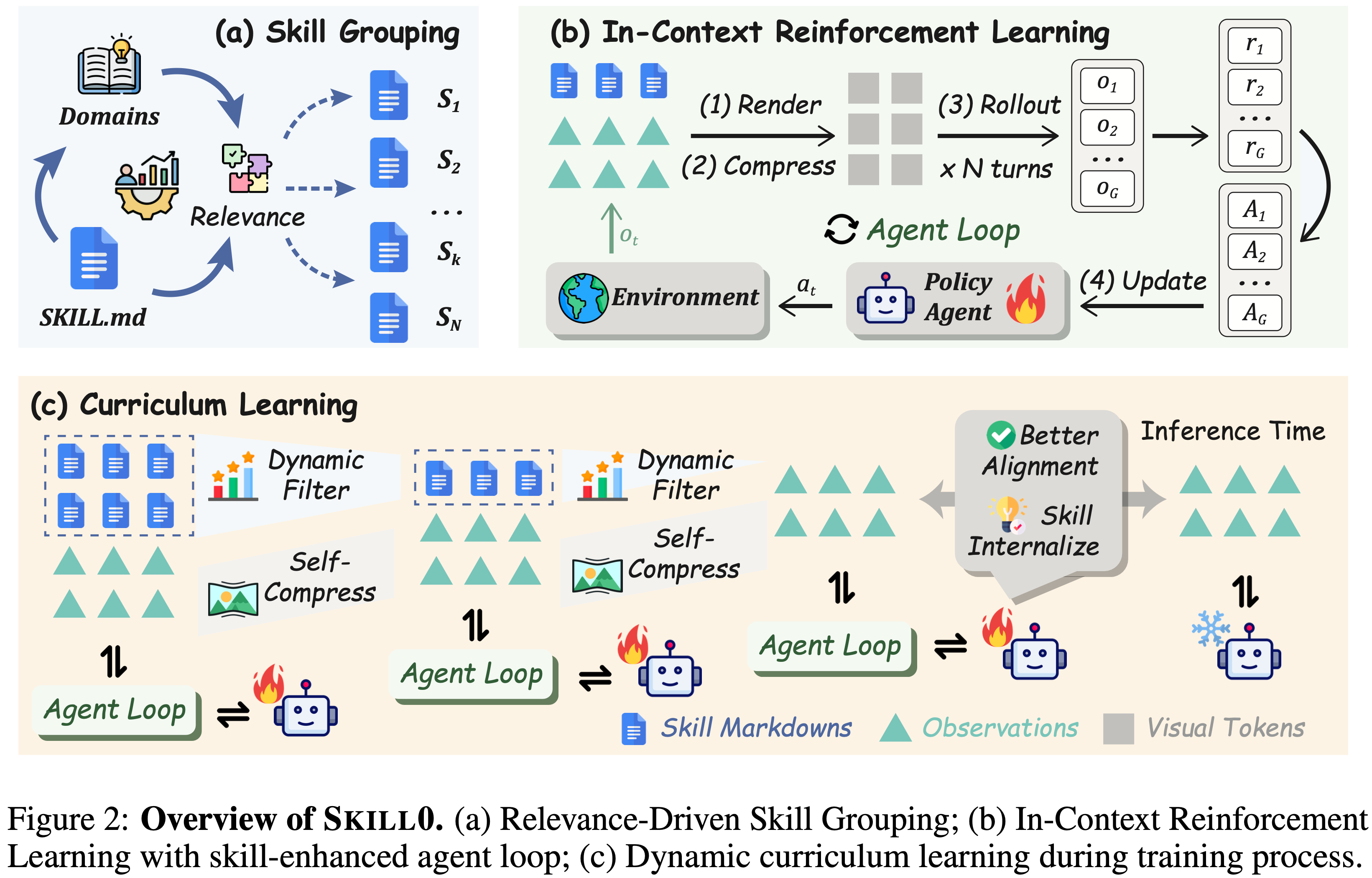
- 模块 (a) Relevance-Driven Skill Grouping
- 离线将技能文件与验证子任务关联
- 按任务类别将技能分组,确保每个技能有对应的评估子任务
- 模块 (b) In-Context Reinforcement Learning
- 训练时提供技能指导,推理时移除
- 视觉上下文压缩 + 复合奖励函数
- 模块 (c) Dynamic Curriculum Learning
- 渐进式退火技能依赖
- Helpfulness 驱动的自适应选择 + 线性预算衰减
Skill0 方法详细介绍
Agent Loop 任务定义
- 将 Agent 自动化建模为序列决策问题
- 给定任务指令 \( I \),Agent 生成动作序列 \( \{a_1, a_2, \ldots, a_T\} \) 以完成任务
- 在每个时间步 \( t \):
- Agent 在结构化环境 \( \mathcal{E} \)(如在线模拟器或检索引擎)中运行
- 环境提供文本观察 \( o_t \) 描述当前状态
- Agent 从策略 \( \pi_{\theta}(a_t|I, h_t) \) 中采样动作 \( a_t \)
- \( \theta \) 表示模型参数,\( h_t \) 表示到时间 \( t \) 为止的历史
$$
h_t = \{o_1, o_2, \ldots, o_t\} \tag{1}
$$ - 环境 \( \mathcal{E} \) 转移到下一状态并返回下一观察:
$$ o_{t+1} = \mathcal{E}(o_t, a_t) $$
- 每条轨迹持续 Rollout 直到任务成功完成或达到最大步数阈值
Skill Management
- 遵循 SkillRL (2026) 的工作,将可重用的行为知识组织为分层技能库 SkillBank ,包含两个层级:
- 1)通用技能(General Skills) :捕获跨所有任务类型通用的战略原则(如探索策略、目标追踪启发式)
- 2)任务特定技能(Task-Specific Skills) :存储任务类别 \( k \) 的专门知识(如领域特定的动作序列和前置条件)
- 技能组织为目录结构:
skills/{task_name}/{skill_category}.md- 每个 Markdown 文件 \( \mathcal{S}_k \) 存储共享相同任务和技能类别的一组相关技能
- 完整库 SkillBank = \( \{\mathcal{S}_k\}_{k=1}^N \) 包含 \( N \) 个文件
- 训练时的选择机制 :
- 不通过语义相似度检索单个技能,而是选择子集 \( \mathcal{S} \subseteq \text{SkillBank} \)(包含 \( m \) 个技能文件),按 On-Policy Helpfulness 标准 (评估每个 \( \mathcal{S}_k \) 对当前策略 \( \pi_{\theta} \) 的学习效用)排序选取
Context Rendering
- 设计思路 :扩展到更多领域时,累积的检索技能和交互历史会带来显著的 Token 成本挑战
- 解决方案 :受 Agentocr(2026) 和 Memocr(2026)启发,引入上下文渲染机制 ,将文本交互上下文(包括历史 \( h_t \) 和检索到的技能 \( \mathcal{S} \))映射为紧凑的 RGB 图像
- 给定压缩比 \( c_t \),渲染图像被 Vision Encoder Enc 编码并压缩为视觉表示:
$$
\mathcal{V}_t = \text{Enc}(h_t, \mathcal{S}; c_t) \tag{2}
$$- \( \mathcal{V}_t \in \mathbb{R}^d \) 作为压缩后的视觉上下文嵌入,输入到策略中
- 关键创新 :压缩比 \( c_t \in (0,1] \) 不是固定超参数,而是由策略在每个步骤与任务动作 \( a_t \) 一起自生成 :
$$
(a_t, c_t) \sim \pi_\theta(a_t, c_t | I, \mathcal{V}_t) \tag{3}
$$ - Context Rendering 具体流程如下:
- 1)输入映射 :将当前步的交互历史 \( h_t \) 和活跃技能集 \( \mathcal{S} \) 渲染为一张 RGB 图像
- 为了便于视觉编码器区分不同来源的信息,采用了语义颜色编码(例如在 ALFWorld 中,观察信息渲染为蓝色,动作渲染为红色)
- 2)视觉编码与压缩 :给定一个压缩比 \( c_t \),Vision Encoder(视觉编码器) \(\text{Enc}\) 对该图像进行编码和压缩,生成压缩后的视觉上下文嵌入:
$$
\mathcal{V}_t = \text{Enc}(h_t, \mathcal{S}; c_t)
$$- \( \mathcal{V}_t \in \mathbb{R}^d \) 作为精简的视觉特征输入到策略网络 \( \pi_{\theta} \) 中
- 3)动态压缩决策(核心创新) :与传统方法将压缩比作为固定超参数不同,SKILL0 允许策略在每个时间步与任务动作 \( a_t \) 联合自生成压缩比 \( c_t \) :
$$
(a_t, c_t) \sim \pi_\theta(a_t, c_t | I, \mathcal{V}_t)
$$- 模型可以自主权衡图像质量与 Token 成本(\( c_t \in (0,1] \),数值越小压缩越狠,成本越低但信息损失越大)
- 4)奖励约束 :为了激励模型高效利用这一机制,复合奖励函数 \( \tilde{r}_t \) 中包含了压缩奖励项。只有当任务成功(\( \mathcal{I}_{\text{succ} }(\tau)=1 \))时,模型才能从更高的压缩比(即更小的 \( c_t \))中获得正向激励(\( \ln(c_t) \)),从而引导模型在保证性能的前提下,主动压缩上下文
- 1)输入映射 :将当前步的交互历史 \( h_t \) 和活跃技能集 \( \mathcal{S} \) 渲染为一张 RGB 图像
In-Context Reinforcement Learning(ICRL)
ICRL 设计思路
- SKILL0 引入 In-Context Reinforcement Learning(ICRL) ,结合:
- Skill Prompting 的样本效率和归纳偏置
- RL 的探索能力
- 通过动态在线课程(Section 3.3),技能被 渐进地内化到模型参数中 ,消除推理时显式技能检索的需要
Composite Reward,复合奖励函数
- 设计思路 :同时优化任务成功和压缩效率,激励 Agent 在保持性能的同时压缩上下文
- 令 \( \mathcal{I}_{\text{succ} }(\tau) \in \{0,1\} \) 表示轨迹 \( \tau \) 的二元成功指示符,复合奖励定义为:
$$
r_t^{\text{comp} } =
\begin{cases}
\ln(c_t), & \text{if } \mathcal{I}_{\text{succ} }(\tau) = 1,\
0, & \text{otherwise},
\end{cases}
\qquad
\tilde{r}_t = r_t + \lambda \cdot r_t^{\text{comp} } \tag{4}
$$- \( c_t \in (0,1] \):时间步 \( t \) 的压缩比
- \( \ln(c_t) \):对数形式反映更高压缩的递减边际收益
- \( r_t \):评估 Agent 在时间步 \( t \) 是否在技能增强下正确完成任务
- \( \lambda \geq 0 \):控制任务性能和压缩效率之间的权衡
ICRL 训练目标
- 对每个 Query \( q \sim \mathcal{D} \),\( \pi_{\theta_{\text{old} } } \) 采样一组 \( G \) 条轨迹 \( \{\tau_i\}_{i=1}^G \)
- 训练目标为:
$$
\mathcal{L}_{\text{Skill0} }(\theta) = \mathbb{E}_{\tau_i \sim \pi_{\theta_{\text{old} } }(q), q \sim \mathcal{D} } \frac{1}{\sum_{i=1}^G |\tau_i|} \sum_{i=1}^{|\tau_i|} \text{clip}(r_{i,t}(\theta), A_i, \epsilon) - \beta \cdot \mathbb{D}_{\text{KL} }[\pi_{\theta} | \pi_{\text{ref} }] \tag{5}
$$- \( A_i \):通过组内总奖励 \( \{\tilde{r}(\tau_i)\}_{i=1}^G \) 归一化计算的 Advantage
- \( r_{i,t}(\theta) = \pi_{\theta}(\tau_{i,t} | q, \tau_{i,< t}) / \pi_{\theta_{\text{old} } }(\tau_{i,t} | q, \tau_{i,< t}) \):重要性采样比(Importance Sampling Ratio)
- \( \text{clip}(\cdot, A_i, \epsilon) \):PPO 风格的裁剪操作
- \( \mathbb{D}_{\text{KL} }[\pi_{\theta} | \pi_{\text{ref} }] \):与参考模型的 KL 散度约束
- \( \beta \):KL 惩罚系数
Adaptive Curriculum Learning,自适应课程学习
设计思路
- 随着训练推进,外部技能依赖经历受控的退火过程 ,以避免上下文空间中的突变分布偏移
- 课程学习分为两个阶段:
- 1)离线阶段 :Relevance-Driven Skill Grouping
- 2)在线阶段 :Helpfulness-Driven Dynamic Curriculum
Linear Budget Decay,线性预算衰减
- 将课程形式化为每个阶段 \( s \in \{1, \ldots, N_S\} \) 的技能预算 \( M^{(s)} \) 的线性衰减 :
$$
|\mathcal{S}^{(s)}| \leq M^{(s)} = \left\lfloor N \cdot \frac{N_S - s}{N_S - 1} \right\rfloor \tag{6}
$$- \( N \):技能文件总数
- \( N_S \):课程阶段总数
- \( M^{(s)} \):第 \( s \) 阶段允许的最大技能数量
- \( \mathcal{S}^{(s)} \):第 \( s \) 阶段的活跃技能集合
- 线性衰减确保了每步技能上下文的减少量被严格限制在
$$ M^{(s)} - M^{(s+1)} \approx \frac{N}{N_S - 1} $$- 保证了策略 \( \pi_{\theta}(a_t, c_t | I, \mathcal{V}_t^{(s)}) \) 的分布偏移保持平滑稳定,最终安全过渡到完全自给自足状态(\( \mathcal{S}^{(N_S)} = \emptyset \))
Relevance-Driven Skill Grouping
- 验证子任务与技能文件 \( \mathcal{S}_k \) 之间的相关性,由该子任务的领域和目标是否与 \( \mathcal{S}_k \) 编码的技能类别一致来判定
- 方法是:在训练前将验证集划分为 \( N \) 个子任务 \( \{\mathcal{T}_k\}_{k=1}^N \),其中 \( \mathcal{T}_k \) 分组所有技能需求与 \( \mathcal{S}_k \) 对应的验证实例
- 目标是:确保每个 \( \mathcal{S}_k \) 有专用的子任务来评估其效用,形成后续动态课程的结构基础
Helpfulness-Driven Dynamic Curriculum
- 将训练过程分为 \( N_S \) 个渐进阶段,技能预算 \( M \)(\( |M| = N_S \))递减
- Helpfulness 指标 \( \Delta_k \) :对每个技能文件 \( \mathcal{S}_k \) 对当前策略 \( \pi_{\theta} \) 的帮助度进行量化,每 \( d \) 个训练步,在两种条件下评估 \( \mathcal{T}_k \):
- 有技能(w/skill) :提供 \( \mathcal{S}_k \)
- 无技能(w/o skill) :不提供 \( \mathcal{S}_k \)
$$
\Delta_k = \text{Acc}(\pi_\theta, \mathcal{T}_k, \mathcal{S}) - \text{Acc}(\pi_\theta, \mathcal{T}_k, \mathcal{S} \setminus \{\mathcal{S}_k\}) \tag{7}
$$
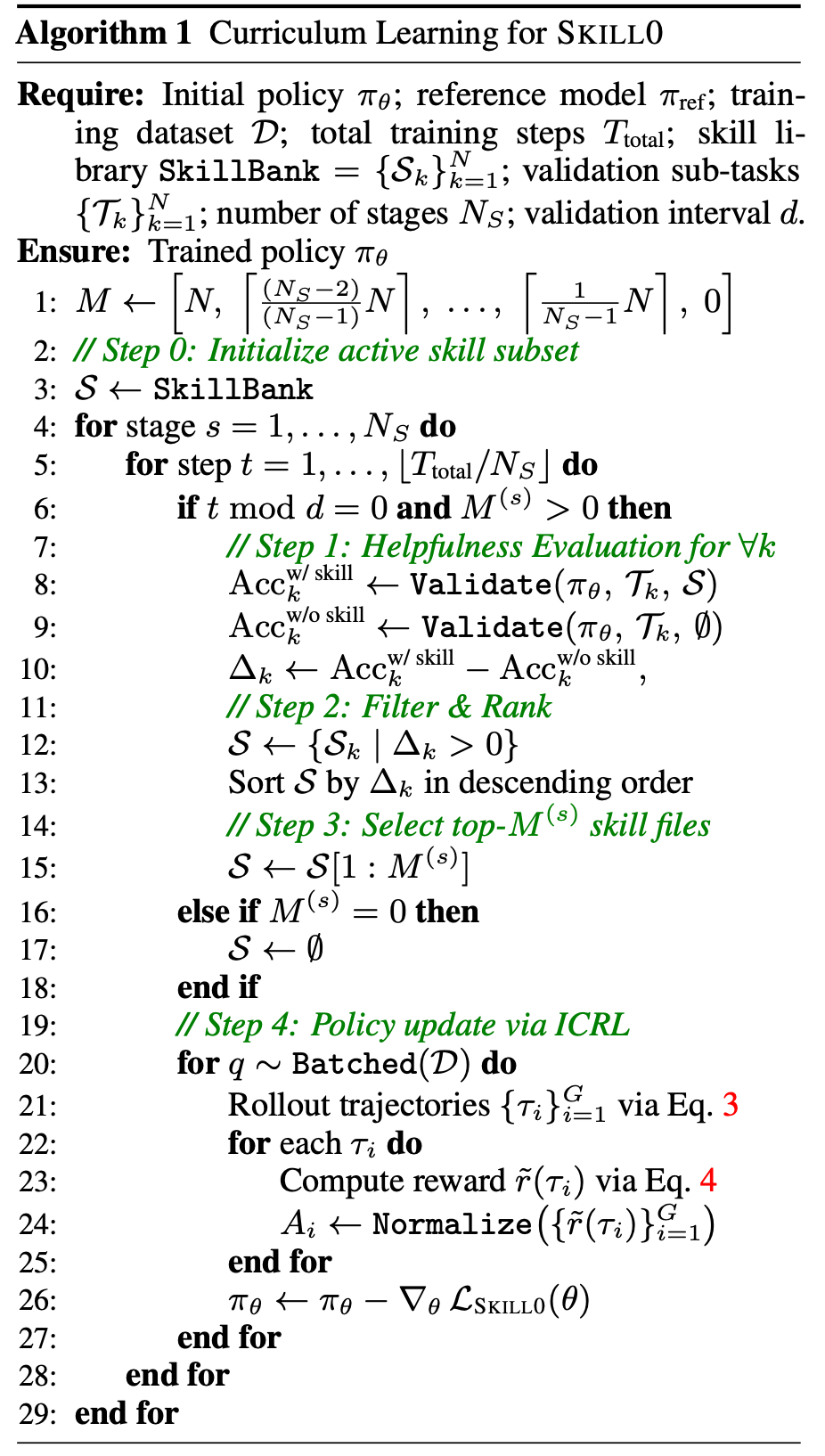
- 选择策略 :对阶段 \( s \),从活跃技能池中按 \( \Delta_k \) Filter(过滤)、Rank(排序)、Select(选择) Top-\( m \)(\( m \leq M^{(s)} \))个文件
- 算法流程(Algorithm1)
- 1)对每个技能文件 S_k,计算 delta_k
- 2)过滤:仅保留 delta_k > 0 的技能(当前策略仍受益)
- 3)排序:按 delta_k 降序排列
- 4)选择:取前 M^(s) 个作为当前阶段的活跃技能集
- 5)随阶段推进,M^(s) 线性递减至 0
附录:理论基础
- 详情见原始论文
实验(论文原文中有更多实验和实现细节)
- Benchmarks
- ALFWorld :
- 基于文本的游戏,对齐 ALFRED 具身 AI 基准
- 3,827 个实例
- 6 个类别
- Pick(拾取)
- Look at Obj in Light(在光线下看物体)
- Clean(清洁后放置)
- Heat(加热后放置)
- Cool(冷却后放置)
- Pick2(拾取两个物体)
- Search-based QA
- 单跳和多跳 QA 数据集(NQ, TriviaQA, PopQA, HotpotQA, 2Wiki, MuSiQue, Bamboogle)
- 多数据集
- WebShop
- 基于 Web 的交互式在线购物环境
- 128 个固定验证任务
- ALFWorld :
- Baselines
- In-Context Skill Prompting :文本和 OCR 历史方法
- RL-based :GRPO , AgentOCR , EvolveR , SkillRL
- ALFWorld 额外对比 :ReAct , Reflexion , Mem0 , ExpeL , MemP , MemRL , SimpleMem
- Search-QA 额外对比 :Search-o1 , Search-R1 , ZeroSearch , O2-Searcher , StepSearch , ParallelSearch
- Closed-source :GPT-4o , Gemini-2.5-Pro
- Backbone :Qwen2.5-VL-3B, Qwen2.5-VL-7B
实验结果
- ALFWorld 结果
方法 3B 模型 Avg 7B 模型 Avg Vanilla 15.2 14.8 GRPO 79.9 77.6 AgentOCR 78.2 81.2 SKILL0 (Ours) 87.9 89.8 - 相比 AgentOCR 提升 **+9.7%**(3B)和 **+8.6%**(7B)
- Search-QA 结果
方法 3B 模型 Avg 7B 模型 Avg Search-R1 26.4 36.8 ZeroSearch 31.1 39.4 EvolveR 32.8 43.2 AgentOCR 34.2 37.8 SKILL0 (Ours) 40.8 44.4 - 相比 AgentOCR 提升 +6.6%
- WebShop 结果
方法 Score (%) Accuracy (%) Few-Shot 47.3 20.3 AgentOCR (3B) 75.2 59.3 SKILL0 (Ours 3B) 78.6 64.6 AgentOCR (7B) 78.6 59.3 SKILL0 (Ours 7B) 85.1 74.2 - 相比 AgentOCR 在 Score 上提升 +10.1% ,在 Accuracy 上提升 +14.9%
- Token 效率
方法 ALFWorld (k/step) Search-QA (k/step) WebShop (k/step) SkillRL (Text) 2.21 0.87 - SKILL0 (Ours) 0.38 0.18 0.49 - SKILL0 的 Token 成本比 SkillRL 低 5 倍以上
- 相比 Few-Shot 推理,SKILL0 实现了近 2 倍的上下文成本降低,同时准确率提升超过 3 倍
训练 Dynamics 分析
- 奖励曲线(Reward Curves)
- 如图 3 和图 4 所示:
- SKILL0 在 3B 和 7B 模型上都持续保持更高的 Reward 曲线
- 相比 AgentOCR 基线,优化更稳定且收敛值更高
- 如图 3 和图 4 所示:
- 验证准确率动态(Validation Accuracy Dynamics)
- 如图 5 所示:
- (a) 有技能 vs 无技能验证 :
- 有技能 :早期性能提升更快
- 无技能 :初始性能较低,但训练结束时逐渐赶上
- 揭示清晰的技能内化趋势
- (b) SKILL0 vs AgentOCR(均无技能推理) :
- SKILL0 在公平比较下仍优于 AgentOCR
- 性能优势源于内化知识而非依赖显式技能描述
- (c) SKILL0 vs GRPO vs SkillRL(均无技能推理) :
- GRPO 和 SkillRL 训练早期就趋于平台期
- SKILL0 在整个优化过程中持续稳定提升
- 最终达到所有方法中的最高性能上界
- (a) 有技能 vs 无技能验证 :
- 如图 5 所示:
- Helpfulness 动态
- 如图 6 所示,所有子任务的 Helpfulness \( \Delta_k \) 呈现一致的先升后降模式 :
阶段 \( \Delta_k \) 变化 解释 早期 低 策略尚未学会利用 Skill Prompt 中期 上升 策略逐渐学会将动作建立在提供的 Skill Context 上 后期 收敛至 0 动态课程减少技能预算,策略将知识内化到参数中
- 如图 6 所示,所有子任务的 Helpfulness \( \Delta_k \) 呈现一致的先升后降模式 :
Ablation Studies
- 技能预算 \( M \) 的消融
预算设置 有技能(w/S) 无技能(w/o S) delta SKILL0 [6,3,0] 86.3 87.9 +1.6 Fixed Full [6,6,6] 85.9 72.6 -13.3 [3,3,3] - 78.9 - [0,0,0] - 78.9 - - Insight:
- Fixed Full 和 [6,6,6] 在移除技能后性能崩溃(-12.3% 和 -13.3%)
- SKILL0 甚至在移除技能后获得 +1.6% 的提升(正迁移)
- 静态低预算 [3,3,3] 限制了早期探索,导致学习不稳定和峰值较低
- Insight:
- 动态课程组件消融
方法 w/o S 性能 delta Filter & Rank & Select(完整) 87.9 +1.6 w/o Filter(预算内用所有技能) 78.9 -2.7 w/o Rank(随机选择) 62.9 -13.7 - Insight
- w/o Filter :上下文噪声导致性能下降 2.7%
- w/o Rank :随机选择导致严重崩溃(delta = -13.7%,降至 62.9%)
- 证明严格保留有帮助的技能对稳定策略学习和防止表面 Prompt 依赖至关重要
- Insight
- 验证间隔 \( d \) 的消融
\( d \) ALFWorld Search-QA 5 87.9 49.6 10 87.9 48.9 20 78.1 42.3 - 较小的间隔(\( d = 5 \))在 Search-QA 上有边际提升,但计算开销显著更高
- \( d = 10 \) 作为最优权衡:平衡了高性能和训练效率
AgentOCR (Context Rendering)
- AgentOCR: Reimagining Agent History via Optical Self-Compression, NTU & Tongyi, 2026
- AgentOCR 整体框架:
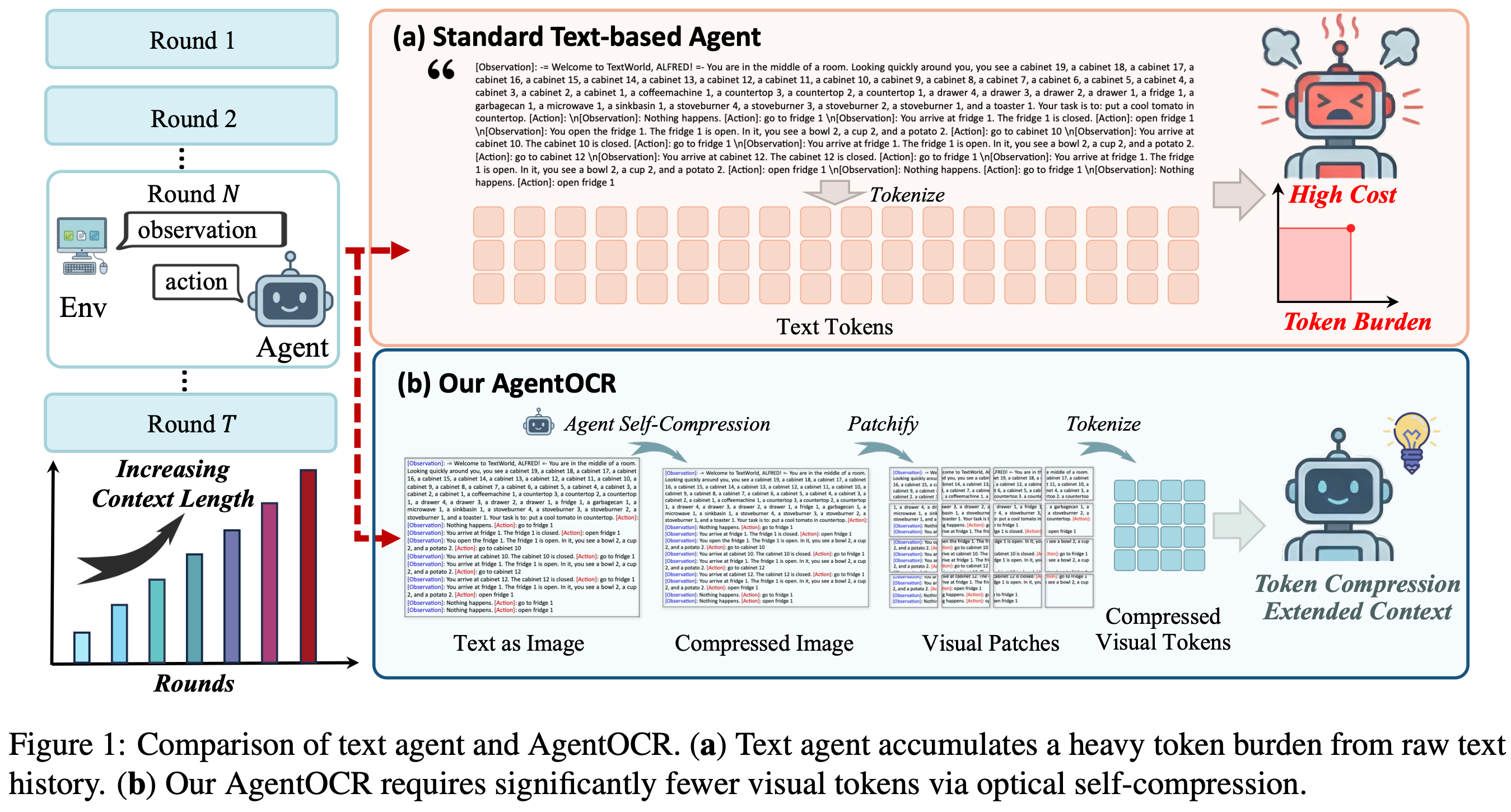
- 详情待阅读原文
ReTool
- 原始论文:ReTool: Reinforcement Learning for Strategic Tool Use in LLMs, ICLR 2026, ByteDance
- ReTool 是一个新颖的 RL 框架,将代码解释器执行集成到 LLM 的推理循环中:
- 支持交织代码执行的 Rollout
- 通过沙箱反馈实现迭代优化
- 无需人工先验,模型自主探索最优策略
背景 & 问题
- 模型在处理需要精确数值计算 、符号操作 或复杂方程求解 的任务时(如几何推理、精确计算),常常不够精确
- 纯文本推理面临两个关键挑战:
- 计算不精确性 :纯文本的逐步计算容易产生累积误差
- 推理效率低 :复杂的计算过程占用大量 Token,降低推理效率
- 代码解释器(Code Interpreter,CI) 等计算工具能够提供形式化、可执行的接口,支持枚举、验证和精确计算,天然适合处理上述问题
- 现有工作的局限
- 通过 Prompt 工程 和 SFT 来赋予 LLM 工具使用能力,但这些方法存在根本性局限:
- 只能模仿特定数据分布,难以泛化到未见过的模式
- 无法自适应地决定何时 以及如何 调用外部工具
- 模型可能误用工具或依赖脆弱的启发式规则
- 通过 Prompt 工程 和 SFT 来赋予 LLM 工具使用能力,但这些方法存在根本性局限:
- ReTool 的定位:ReTool 是一个工具增强的强化学习框架
- 1)动态交织 :在自然语言推理过程中实时交织代码执行
- 2)自动 RL 范式 :允许策略模型进行多轮实时代码执行的 Rollout,基于结果反馈学习何时及如何调用工具
- 3)无需人工先验 :模型自主探索最优的工具调用模式
ReTool 方法详解
整体框架概览
- ReTool 采用两阶段训练策略 :
- 第一阶段:冷启动 SFT
- 第二阶段:RL 训练
冷启动阶段:工具集成推理基础
- 数据收集与过滤
- 从多个来源(包括 Open-Thoughts 等开源数据集)收集数学推理数据
- 使用 双重验证机制 保证质量:
- 人工专家筛选 :确保数据质量
- DeepSeek-R1 评估 :自动化过滤无效数据
- 最终获得高质量的纯文本推理数据集 \(\mathcal{D}_{\text{init} }\)
- 代码增强数据构造
- 基于 \(\mathcal{D}_{\text{init} }\),设计一个自动化的代码增强数据构造 Pipeline :
- 1)结构化 Prompt 转换(见附录 Figure 9):
- 识别原始推理过程中可从代码执行获益的手动计算步骤
- 将这些步骤替换为对应的代码片段及其解释器执行结果
- 保留核心推理逻辑(包括失败的探索尝试)
- 2)两阶段验证协议 :
- 格式验证 :确保代码语法正确、可读性高,便于 RL 阶段检测工具调用触发
- 答案验证 :剔除最终输出与正确答案不符的数据样本
- 1)结构化 Prompt 转换(见附录 Figure 9):
- 最终得到代码增强的长链推理数据集 \(\mathcal{D}_{\text{CI} }\)
- 基于 \(\mathcal{D}_{\text{init} }\),设计一个自动化的代码增强数据构造 Pipeline :
- SFT:ReTool 使用 \(\mathcal{D}_{\text{CI} }\) 对基础模型进行 SFT,学习:
- 何时调用代码解释器
- 如何编写有效的代码
- 如何解读和分析执行结果
ReTool:RL 阶段
- 训练算法:改进后的 PPO
- ReTool 基于 PPO 进行训练,其优化目标为:
$$
\begin{aligned}
\mathcal{J}_{\text{PPO} }(\theta) = \mathbb{E}_{(q,a)\sim\mathcal{D},\ o_{\leq t}\sim\pi_{\theta_{\text{old} } }(\cdot|q)} \Bigg[
& \min \Bigg(
\frac{\pi_{\theta}(o_t | q, o_{ < t}; \mathcal{CI})}{\pi_{\theta_{\text{old} } }(o_t | q, o_{ < t}; \mathcal{CI})} \hat{A}_t, \\
& \quad \text{clip}\left(\frac{\pi_{\theta}(o_t | q, o_{ < t}; \mathcal{CI})}{\pi_{\theta_{\text{old} } }(o_t | q, o_{ < t}; \mathcal{CI})}, 1-\epsilon, 1+\epsilon\right) \hat{A}_t
\Bigg)
\Bigg]
\end{aligned}
$$- \(\pi_{\theta}\) :当前策略模型
- \(\pi_{\theta_{\text{old} } }\) :参考策略模型,用于稳定训练
- \(q\) :Question)
- \(a\) :真实答案(Ground-truth Answer)
- \(o_t\) :第 \(t\) 步输出 Token
- \(\mathcal{CI}\) :Code Interpreter 交互
- \(\hat{A}_t\) :Advantage Function 估计
- \(\epsilon\) :PPO 裁剪超参数
- 核心:\(\pi_{\theta}(o_t | q, o_{ < t}; \mathcal{CI})\) 表示策略在交织代码执行和解释器反馈 条件下的 Rollout,这与传统纯文本 RL 有本质区别
- ReTool 基于 PPO 进行训练,其优化目标为:
- 奖励设计
- 为教会模型何时 以及如何 调用工具,论文采用 Rule-based Accuracy Reward :
$$
R(a, \hat{a}) = \begin{cases}
1, & \text{is_equivalent}(a, \hat{a}) \\
-1, & \text{otherwise}
\end{cases}
$$- \(a\):真实答案
- \(\hat{a}\):模型预测答案(要求放在 \(\backslash\text{boxed}\{\}\) 中以便解析)
- 基本思路:
- 仅考虑最终答案正确性,不考虑代码可执行性奖励
- 减轻 Reward Hacking 问题,促进多样化 的解题行为
- 基于结果反馈,让模型自主探索最优策略
- 为教会模型何时 以及如何 调用工具,论文采用 Rule-based Accuracy Reward :
Rollout 过程:交织代码执行
- 与传统纯文本 Rollout(Figure 2a)不同,ReTool 的 Rollout(Figure 2b)动态支持代码执行与自然语言推理的交织:
- 1)策略模型生成文本推理 \(t_1\)
- 2)当检测到代码终止标记
</code>时,生成暂停 - 3)解析代码 \(c_1\),发送到代码沙箱环境执行
- 4)沙箱返回执行结果 \(f_1\)(成功输出或错误信息)
- 5)结果被包裹在
<interpreter></interpreter>标签中,反馈给模型 - 6)模型继续生成,直到给出最终答案或生成新的代码
- 7)最终产生混合推理轨迹:\([t_1 \oplus c_1 \oplus f_1 \oplus \ldots \oplus o]\)
ReTool 训练实现细节
- Interpreter Feedback Mask
- 将
<interpreter></interpreter>中的内容从 Loss 计算中屏蔽- 防止外部工具输出干扰模型参数更新
- 确保训练稳定性
- 保持模型生成连贯推理序列的能力
- 将
- KV-Cache 复用
- 为降低 Rollout 时的显存开销:
- 检测到
<code>触发时,缓存所有 KV-Cache - 仅计算和追加解释器反馈部分的 KV-Cache
- 大幅减少每次 Rollout 的显存占用
- 检测到
- 为降低 Rollout 时的显存开销:
- 异步沙箱架构
- 为加速 RL 训练,论文设计了异步代码沙箱环境 :
- 沙箱 Pod 作为 Worker 池中的工作节点
- 根据当前容量独立拉取任务
- 实现高效的负载均衡
- 支持多线程并行环境交互
- 防止慢速线程成为瓶颈,保持持续吞吐量
- 为加速 RL 训练,论文设计了异步代码沙箱环境 :
- 超参数设置
超参数 取值 优化器 AdamW 初始学习率 1e-6 最大序列长度 16384 Tokens Mini-batch 大小 512 KL 系数 0.0 主干模型 Qwen2.5-32B-Instruct 硬件 NVIDIA H20 GPU
实验
- 评估设置,为确保评估稳定性,论文采用多次采样平均的策略:
- AIME2024 & AIME2025:32 次采样
- GPQA(Diamond):8 次采样
- MATH500:4 次采样
- GSM8K:2 次采样
- 推理超参数:Temperature = 1.0,Top-p = 0.7
- Main Results
- 基于 Qwen2.5-32B-Instruct 的结果
模型 AIME2024 AIME2025 GSM8K MATH500 GPQA Qwen2.5-Math-72B-Instruct 30.0 - 95.9 85.9 - Qwen2.5-Math-72B-Instruct-TIR 40.0 - 95.8 88.1 - Sky-T1 43.3 - - 82.4 56.8 OpenAI o1-preview 44.6 37.9 - 85.5 73.3 DeepSeek-R1-Zero-Qwen-32B 47.0 - - 94.3 62.1 QWQ-32B-Preview 50.0 33.5 - 90.6 54.5 s1-32B 56.7 - - 93.0 59.6 ReTool (Qwen2.5-32B-Instruct) 67.0 49.3 95.9 93.1 58.7 - Insight:
- ReTool 仅用 400 训练步 达到 67.0% 的 AIME2024 准确率
- 纯文本 RL 基线(Text-based RL)需要 1080 步 仅达到 40.0%
- ReTool 在 AIME2024 上超越 s1-32B 达 10.3%
- 在 AIME2025 上超越 OpenAI o1-preview 达 11.4%
- 基于 Qwen2.5-32B-Instruct 的结果
- 基于 DeepSeek-R1-Distill-Qwen-32B 的结果
模型 AIME2024 AIME2025 ReTool (DeepSeek-R1-Distill-Qwen-32B) 72.5 54.3 - ReTool-32B 达到 72.5% 的准确率,超越 OpenAI o1-preview 27.9%
- 消融实验,对比了三个变体(均基于 Qwen2.5-32B-Instruct):
变体 说明 AIME2024 准确率 w/o RL 仅冷启动 SFT(含 CI) 40.9% w/o CI 纯文本 RL(含文本 SFT) 40.0% w/o Training 原始基础模型 26.7% ReTool(完整) SFT + RL + CI 67.0% - Insight:
- 移除 RL 或 CI 都会导致显著性能下降
- 冷启动模型(40.9%)已接近纯文本 RL 基线(40.0%),证明代码增强数据集有效捕捉了工具使用模式
- CI 集成训练进一步增强推理性能
- Insight:
其他实验:扩展到 Web 搜索场景
- 目标:验证ReTool 在更广泛工具使用场景中的泛化能力
- 设置:
- 工具:Bing Search(遵循 MCP 工具定义)
- 基准:GAIA 和 BrowseComp-ZH
- 结果(Figure 3b):
- 使用相同主干(Qwen2.5-32B),ReTool 一致超越:
- WebDancer(2025)
- Search-o1(2025a)
& ReTool 的泛化能力超越数学推理任务,适用于多样化的工具使用环境
- 使用相同主干(Qwen2.5-32B),ReTool 一致超越:
分析 涌现行为:Code Self-Correction
- 模型在没有显式训练数据的情况下,涌现出代码自我修正能力:
1)初始代码因未定义函数greedy()而执行失败
2)收到解释器错误反馈后,模型生成反思
3)随后生成包含完整函数定义的修正代码> "Oops, the functions need to be defined in the same scope. Let's correct that." - 理解:
- RL 训练促进了元认知能力的发展
- 模型能够迭代优化生成的代码
- 这种能力超越了单纯的模仿学习
补充:Cognitive Analysis,认知行为分析
CI 相关行为演化(Figure 4)
论文系统分析了 RL 训练过程中六个关键指标的变化
(a)Response Length
1
2
趋势:先急剧下降 → 后温和上升
最终:从 10k → 6k(缩短约 40%)- 初始下降 :复杂计算过程被简洁代码替代
- 后续上升 :RL 过程中涌现出更多样化、更复杂的代码行为
- 意义 :CI 增强推理提高了推理 Token 利用效率
(b)Code Ratio
1
2
趋势:持续上升
最终:覆盖约 98% 的问题- 模型在 RL 过程中逐步提升代码使用熟练度,促进策略性工具使用发展
(c)代码行数
1
2
趋势:持续上升
最终:约为 RL 前的 5 倍- 模型学会了更复杂的代码策略,反映了代码复杂度的提升
(d)Frequency of Emerging Code Self-Correction
1
2
趋势:早期出现并达到峰值 → 逐渐下降并稳定
检测方式:识别转折词(如 "oops"、"wait"、"correcting")- 当模型代码生成能力有限时,频繁使用自我修正
- 随着 RL 训练提升,模型能直接生成正确代码,修正需求减少
- 反映了涌现行为 的动态演化
(e)Code Pass Rate
1
2
正确响应:持续保持接近 100%
错误响应:呈下降趋势- 代码可执行性影响推理过程和最终结果
(f)Code Invocation Timing,代码调用时机
1
2
定义:代码起始位置 / 响应总长度
趋势:持续提前- 模型学会了何时调用工具,策略性工具使用得到发展
代码目的分析(Code Purpose Analysis,Figure 5)
- 论文使用 Claude4-Sonnet 对代码片段的目的进行分类
- RL 前 :
- 主要目的:计算(Calculation) 和 验证(Verification)
- 目的相对集中
- RL 后 :
- 代码目的更加多样化
- 涌现出更多类型的代码使用模式
- 展示了自适应工具选择的元认知发展
CLIPO
- 原始论文:CLIPO: Contrastive Learning in Policy Optimization Generalizes RLVR, 20260310, CASIA & Qwen Application
- Qwen Large Model Application Team, Alibaba
- Alibaba Qwen Application Business Group
- 整体理解:
- 思路:使用对比学习作为额外的奖励
- 方法:随机选择一个正样本基线,让其他正样本与他靠近,让负样本与他远离
Introduction & Motivation
- 当前的 RLVR 方法(如 GRPO, GSPO, DAPO)存在一个根本性的缺陷 :它们仅依赖最终答案(Outcome)作为 Reward 信号,而完全忽视了中间推理步骤的正确性
- 这种粗粒度的二元 Reward 机制存在两大风险:
1)幻觉(Hallucination)和答案复制(Answer-Copying) :模型可能通过错误的推理过程蒙对最终答案,但训练时却获得正向奖励,导致模型学会“投机取巧”
2)泛化能力差(Poor Generalization) :模型倾向于记住 Ground-Truth 答案,而不是学习到普适的逻辑推理结构,导致在 OOD 数据上性能急剧下降 - 现有解决方案的不足
- PRMs :通过标注每一步推理的正确性来提供细粒度监督
- 但 PRM 的核心瓶颈在于需要大量昂贵且难以扩展的人工标注数据
- Entropy-based Methods :利用 Token 级别的熵来提供训练指导
- 但熵主要反映的是模型分布的不确定性,而非语义逻辑的重要性,且其有效性高度依赖模型容量,在不同规模模型上表现不稳定
- PRMs :通过标注每一步推理的正确性来提供细粒度监督
- CLIPO 的 Insight:
- 托尔斯泰的名言:“幸福的家庭都是相似的,不幸的家庭各有各的不幸”
- 作者上述这一思想迁移到推理任务中:
- Insight:
- Correct Rollouts 共享一个潜在的、一致的逻辑结构(即“共性”)
- 错误的推理路径则包含随机、不相关的噪声(即“个性”)
- 理解:这不一定,条条大路通罗马,很多时候最优解也是有多个的
- 思路:
- 能否利用对比学习(Contrastive Learning)来强化这种“共性”,从而提升 RLVR 的泛化性?通过将成功的 Rollout 拉近(Positive),将失败的 Rollout 推远(Negative),模型可以学到更具鲁棒性的推理表示
- 理解:可能需要限定在特定的场景上可以 Work ,Solution 多样的场景上估计不会 Work
- Insight:
Preliminary
RLVR
- 给定 Prompt \( x \in \mathcal{X} \),策略模型 \( \pi_\theta(\cdot|x) \) 生成 Response \( y \in \mathcal{Y} \)
- RLVR 的目标是最大化期望的可验证 Reward:
$$
\mathbb{E}_{x\sim \mathcal{X},y\sim \pi_{\theta}(\cdot |x)}[r(x,y)] - \beta \text{KL}[\pi_{\theta}||\pi_{\text{ref} }]
$$- \( \pi_{\text{ref} } \) 是参考模型(通常是 \( \pi_\theta \) 的初始 Checkpoint),用于维持训练稳定性,\( \beta \) 是 KL 惩罚系数
- \( r(x, y) \) 是一个二元指示函数。它提取模型生成的最终答案 \( \mathcal{A}(y) \),并与 Ground-Truth \( a^* \) 进行比较:
$$
r(x, y) = \mathbf{1}\{\mathcal{A}(y) = a^*\}
$$
- 以 GRPO 为例,它无需额外的 Critic 模型,而是对每个 Prompt \( x \) 采样一组 Rollout \( \mathcal{G} = \{y_1, \dots, y_G\} \),通过组内归一化计算每个 Rollout \( y_i \) 中每个 Token \( t \) 的优势函数(Advantage):
$$
\hat{A}_i^t = \frac{r_i - \text{Mean}(\{r_1, \dots, r_G\})}{\text{Std}(\{r_1, \dots, r_G\})}
$$- GRPO 的最终策略梯度为:
$$
\mathbb{E}_{x\sim \mathcal{X} }\left[\frac{1}{G}\sum_{i=1}^{G}\sum_{t=1}^{|y_i|}\nabla_{\theta}\log \left(\pi_{\theta}(y_i^t|y_i^{ < t}, x)\cdot \hat{A}_i^t\right)\right]
$$
- GRPO 的最终策略梯度为:
Contrastive Learning
- 对比学习的核心是 InfoNCE 损失函数
- 给定一组配对样本 \( \{(x_i, y_i)\}_{i}^{N} \),其目标是将正样本对在 Embedding 空间中拉近,将负样本对推远:
$$
\mathcal{L}_{\text{InfoNCE} } = -\mathbb{E}_{p(x,y)}\left[\frac{1}{N}\sum_{i=1}^{N}\log \frac{\exp(f(x_i, y_i))}{\sum_{j=1}^{N}\exp(f(x_i, y_j))}\right]
$$- \( f(\cdot, \cdot) \) 是度量相似度的函数
- 最小化 InfoNCE 损失等价于最大化 \( x \) 和 \( y \) 之间的互信息(Mutual Information, MI)的下界,从而捕捉数据背后的共享语义信息
CLIPO 具体方法
- CLIPO 的核心在于构建一个密集的对比奖励信号 ,以补充 RLVR 原有的稀疏二元奖励
CLIPO 总体设计思路
- 目标重定义:在标准 RLVR 目标(最大化 Reward)的基础上,CLIPO 引入了一个正则化项,即最大化成功 Rollout 之间的互信息:
$$
\max_{y,\tilde{y}\sim \pi_{\theta}(\cdot |x)} \mathbb{E}[r(x,y)] + \lambda \cdot \text{I}\left(y;\tilde{y}\mid x, \mathcal{P}_{y,\tilde{y} }\right)
$$- \( \mathcal{P}_{y,\tilde{y} } \) 表示事件 \( \{r(x, y) = 1, r(x, \tilde{y}) = 1\} \),即两个 Rollout 都是正确的。\( \lambda \) 是权衡系数
- MI 估计与 Loss 构建 : 由于精确计算 MI 是困难的,CLIPO 使用 InfoNCE 作为 MI 的 Lower-Bound 估计器。对于每个 Prompt \( x \),其 Rollout 组 \( \mathcal{G} = \{y_1, \dots, y_G\} \) 中的成功子集为 \( \mathcal{P} = \{y_i \in \mathcal{G} : r(x, y_i) = 1\} \)
- CLIPO 的对比损失为:
$$
\mathcal{L}_{\text{CL} }(x) = -\frac{1}{|\mathcal{P}|}\sum_{y \in \mathcal{P} } \log \frac{\exp(f(y, \bar{y}))}{\sum_{y_j \in \mathcal{G} } \exp(f(y, y_j))}
$$- \( \bar{y} \) 是从 \( \mathcal{P} \) 中为当前 Anchor \( y \) 采样出的另一个正样本
- 该 Loss 仅当 \( 1 < |\mathcal{P}| < G \) 时生效
- CLIPO 的对比损失为:
CLIPO 详细实现流程
- CLIPO 的实现流程可以分解为以下几个关键步骤,如图 2 所示:
- 步骤 1:生成 Rollout 组
- 对于每个 Prompt \( x \),策略模型 \( \pi_\theta \) 生成一个包含 \( G \) 个 Response 的组 \( \{y_1, \dots, y_G\} \)
- 步骤 2:计算 RLVR 基础奖励
- 使用外部 Verifier 计算每个 Response 的二元 Reward \( \{r_1, \dots, r_G\} \),其中 \( r_i \in \{0, 1\} \)
- 步骤 3:提取句子级表示 (Sentence-Level Representation)
- 对于组内的每个 Response \( y \),获取其 Token 级的最后一层隐藏状态 \( \bar{\boldsymbol{h} }_\theta(y) \in \mathbb{R}^{T \times D} \),其中 \( T \) 是序列长度,\( D \) 是隐藏层维度
- 通过均值池化(Mean Pooling)操作将 Token 级表示聚合为一个句子级向量:
$$
\boldsymbol{h}_\theta(y) = \frac{1}{T} \sum_{t=1}^{T} \bar{\boldsymbol{h} }_\theta(y)_t
$$
- 步骤 4:通过对比头(Contrastive Head)映射到语义空间
- 将池化后的向量 \( \boldsymbol{h}_\theta(y) \) 输入到一个可学习的对比头(Contrastive Head) \( g_\phi: \mathbb{R}^D \rightarrow \mathbb{R}^d \) 中,得到最终的语义 Embedding \( \boldsymbol{e}(y) \):
$$
\boldsymbol{e}(y) = g_\phi(\boldsymbol{h}_\theta(y))
$$ - 本文中的对比头 \( g_\phi \) 实现为一个简单的线性层(Linear Layer),将向量投影到维度为 \( d \) 的潜在空间中,并进行 \( L_2 \) 归一化
- 将池化后的向量 \( \boldsymbol{h}_\theta(y) \) 输入到一个可学习的对比头(Contrastive Head) \( g_\phi: \mathbb{R}^D \rightarrow \mathbb{R}^d \) 中,得到最终的语义 Embedding \( \boldsymbol{e}(y) \):
- 步骤 5:计算对比损失(Contrastive Loss)
- 在语义 Embedding 空间中,使用 InfoNCE 损失(或其他变体)进行计算。相似度函数 \( f(y, \bar{y}) \) 定义为两个 Embedding 的内积除以温度系数 \( \tau \):
$$
f(y, \bar{y}) = \boldsymbol{e}(y)^\top \boldsymbol{e}(\bar{y}) / \tau
$$ - 最终得到的 \( \mathcal{L}_{\text{CL} } \) 值反映了当前 Rollout 与组内其他 Rollout 的语义一致性。值越小,表示该 Rollout 与成功路径的共识区域越接近
- 在语义 Embedding 空间中,使用 InfoNCE 损失(或其他变体)进行计算。相似度函数 \( f(y, \bar{y}) \) 定义为两个 Embedding 的内积除以温度系数 \( \tau \):
- 步骤 6:生成并集成对比奖励(Contrastive Reward Integration)
- 为了将对比损失转化为一种奖励信号(因为 RLVR 是最大化 Reward,而 Loss 是 Minimize),CLIPO 将对比奖励 \( r_i^{\text{CL} } \) 定义为负的对比损失,并对其进行裁剪以稳定训练:
$$
r_i^{\text{CL} } = \max(-\lambda \cdot \mathcal{L}_{\text{CL} }(x, y_i), -0.5)
$$ - 最终的 CLIPO 奖励 \( r’_i \) 是原始 Verifier 奖励与对比奖励的加和 :
$$
\color{red}{r’_i = r_i + r_i^{\text{CL} }}
$$- 含义理解:即使两个 Response 都正确(\( r_i = 1 \)),与成功路径“共性”更强的那个会获得更高的总奖励,从而引导模型向更稳健的推理模式收敛
- 为了将对比损失转化为一种奖励信号(因为 RLVR 是最大化 Reward,而 Loss 是 Minimize),CLIPO 将对比奖励 \( r_i^{\text{CL} } \) 定义为负的对比损失,并对其进行裁剪以稳定训练:
- 步骤 7:策略优化
- 将 \( r’_i \) 作为新的 Advantage 计算依据(例如在 GRPO 中替代 \( r_i \)),通过标准的 Policy Gradient 方法更新 Actor 模型 \( \pi_\theta \)
- 对比头 \( g_\phi \) 通过 \( \mathcal{L}_{\text{CL} } \) 的梯度进行联合优化
- 步骤 1:生成 Rollout 组
Experiments
- Experimental Setup
- Track I (基础与通用推理) :
- 训练集:GSM8K (~8k 题)
- 评估集:GSM8K Test, GSM8K-Symbolic, GSM8K-P1/P2 (分布偏移变体),以及 CommonsenseQA, TruthfulQA, TheoremQA, MMLU
- 基础模型:Qwen2.5-3B-Instruct
- Track II (竞赛级数学推理) :
- 训练集:MATH 7.5k
- 评估集:MATH500, Math-Perturb (简单/困难), AMC23, AIME, AIME25
- 基础模型:Qwen2.5-7B-Instruct, Llama3.1-8B-Instruct, DeepSeek-R1-Distill-Qwen-7B
- Baselines : 与多种 SOTA 的组策略优化方法对比,包括 GRPO, GSPO, DAPO, GMPO。CLIPO 作为增强模块被集成到这些方法之上
- 评估指标 :主要采用 Pass@1
- Track I (基础与通用推理) :
- Main Results
- Track I 结果 :
- 在 GSM8K 及泛化性测试中,集成了 CLIPO 的所有方法(GRPO+CLIPO 等)在大部分数据集上均取得了最佳或次佳性能
- 在分布外数据集(如 GSM8K-P2)上,提升幅度显著(如 GRPO+CLIPO 提升 +3.36 点)
平均分数(Avg.)上,GRPO+CLIPO 达到最高的 63.26
- Track II 结果 :
- 在更具挑战性的 MATH 和竞赛级数据集上,DAPO+CLIPO 取得了最高的平均分 44.05
- CLIPO 在所有四个基线方法上都带来了一致的性能提升(平均提升 0.8 到 1.35 分),证明了其广泛的适用性
- 核心发现 : 结果表明,对比奖励信号在提升模型对分布偏移、问题扰动和复杂推理的鲁棒性和泛化能力方面特别有效
- Track I 结果 :
- 消融研究与分析
- 对比头的作用
- 固定对比头参数,使其在训练中不更新(CLIPO-fixed)
- 在所有指标上,CLIPO-fixed 相比完整的 CLIPO 均出现显著性能下降(Track I 平均下降 0.77;Track II 平均下降 0.97)
- 结论:联合优化对比头对于学习一个能有效区分高质量与低质量解决方案的语义空间是至关重要的,而非简单地从预训练模型中继承
- 对比损失函数变体
- 比较了三种 Loss:InfoNCE (单正样本), SupCon (监督对比损失,平均所有正样本), SoftNN (软最近邻损失,求和所有正样本),注:原文表 4 总结了它们的差异
- 如图 3 所示,所有变体均能提升基线性能
- 其中 InfoNCE 损失表现最佳 ,在 Track I 上平均提升 +1.13 点
- 结论:虽然具体 Loss 形式影响最终性能,但“在成功轨迹间进行对比学习”这一核心思想是鲁棒的
- 温度系数 \( \tau \) 的影响
- 测试了从 0.2 到 0.01 的不同温度值
- 如表 5 所示,较低的温度(如 \( \tau = 0.02 \),平均分 43.60)通常带来更好的性能,而较高的温度(如 \( \tau = 0.2 \),平均分 42.13)则导致性能下降
- 较低的温度系数会使相似度分布更“尖锐”,迫使模型更关注难分样本(Hard Negatives),从而提升判别能力。这与对比学习领域的理论分析一致
- Group Size 的影响
- 测试了 Rollout 组大小 \( |\mathcal{G}| \) 分别为 8, 16, 32 时的性能
- 如表 6 所示,更大的组大小通常带来更好的性能,特别是在竞赛级数学任务(C-Avg.)上,从 24.87 提升至 26.54
- 更多的 Rollout 意味着更丰富、更多样的正负样本,为对比学习提供了更强的监督信号,也使 Advantage 估计更准确
- 不同基础模型上的泛化性
- 在 DeepSeek-R1-Distill-Qwen-7B (DS-7B) 和 Llama3.1-8B (Llama-8B) 上测试
- 如表 7 所示,集成 CLIPO 在两种模型上均带来了平均性能的提升(DS-7B 提升 +0.53, Llama-8B 提升 +1.31)
- 结论:CLIPO 是一种模型无关(Model-Agnostic)的增强方法,具有良好的跨架构通用性
- 对比头的作用
)-Figure1.png)
)-Figure2.png)
)-Figure3.png)
)-Table1.png)
)-Figure5.png)
)-Figure6.png)